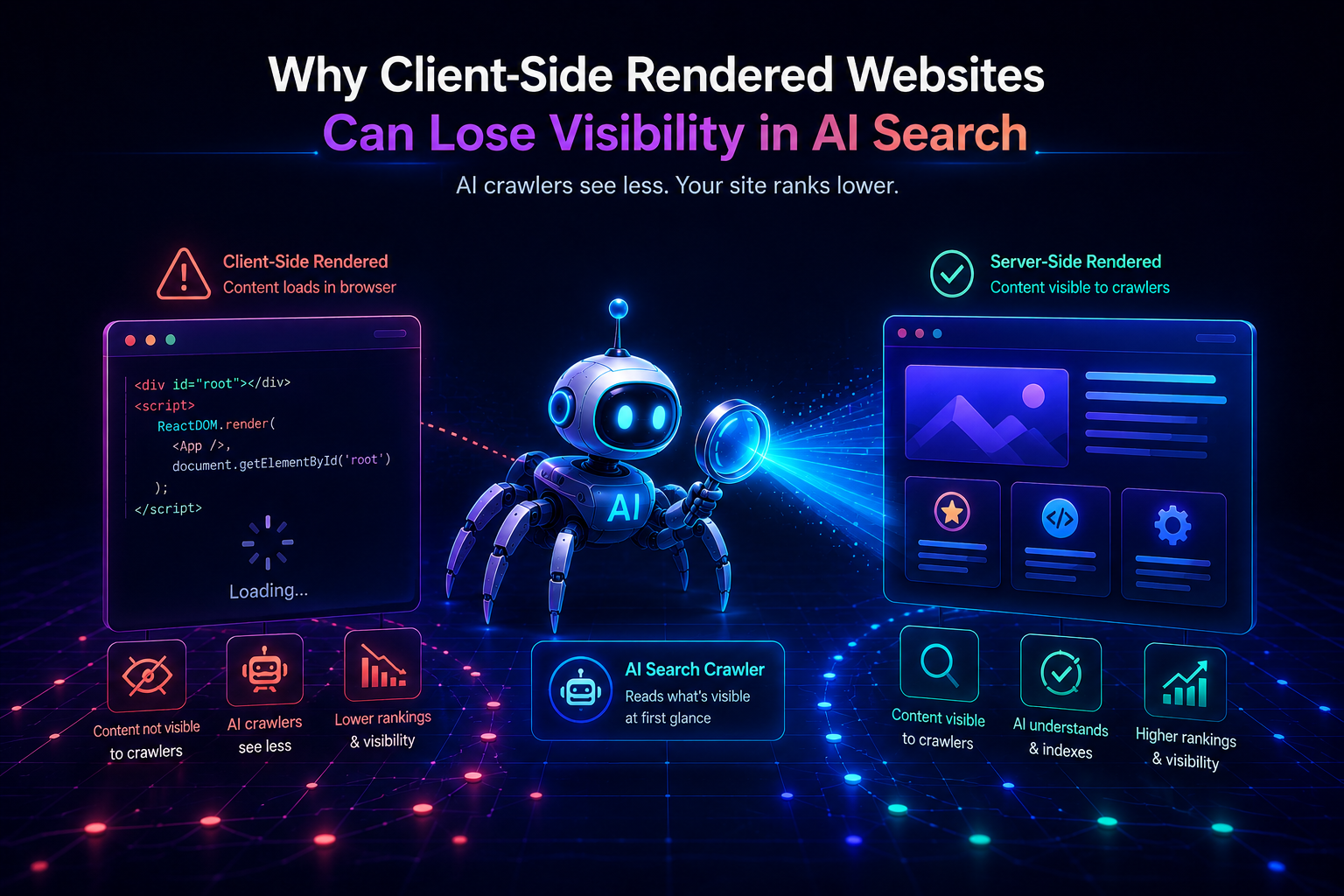
Imagine spending months building a React application. The design is polished. The content is thorough. The copy is sharp. You launch, share the URL, and watch human visitors engage with it perfectly.
Then you ask ChatGPT or Perplexity about the topic your site covers. Your competitor — with a simpler, older-looking WordPress blog — gets cited. You don’t.
The problem is not your design. It is not your copy. It is not even your content. It is the architecture underneath — specifically, the fact that your content only exists after JavaScript runs in a browser. And AI crawlers don’t run JavaScript.
This article explains exactly what client-side rendering does, why it creates a systematic visibility gap in AI search, and how to know whether your site has this problem right now.
What Is Client-Side Rendering?
Client-side rendering (CSR) is a web architecture pattern where the server sends a minimal HTML file to the browser, and JavaScript running in the browser builds the actual page content after it arrives.
Here is how the process works step by step:
- User (or crawler) requests a URL
- Server responds with a bare HTML shell containing almost no content — just a
<div>placeholder and<script>tags pointing to JavaScript files - The browser downloads those JavaScript files (often several hundred kilobytes to several megabytes)
- JavaScript executes in the browser
- JavaScript fetches data from APIs if needed
- JavaScript builds the page’s HTML and inserts it into the DOM
- The page becomes visible and interactive
The result for a human user in a modern browser: a fast, interactive experience once everything loads. The result for an AI crawler: an empty page.
Why Developers Choose CSR
CSR became the dominant architecture pattern for web applications between roughly 2015 and 2022, largely because of the rise of React, Vue, and Angular. The appeal is real:
- Rich interactivity: SPAs (single-page applications) can update content without full page reloads, creating a native-app-like experience.
- Clean separation: The frontend and backend are decoupled — the frontend is a JavaScript app, the backend is an API. Teams can work independently.
- Simple hosting: A CSR app is a folder of static files (HTML, JS, CSS). It can be served from a CDN with no server-side processing required.
- Developer experience: Frameworks like React and Vue have excellent tooling, large communities, and rich ecosystems.
These are genuine advantages — in the right context. The problem is that CSR became the default choice for all websites, including content-heavy public pages that need to be crawled and cited.
Common CSR Frameworks
| Framework | Default Mode | Common Use |
|---|---|---|
| Create React App | CSR | SPAs, dashboards |
| Vite + React/Vue | CSR | SPAs, apps |
| Angular | CSR | Enterprise apps |
| Svelte (SPA mode) | CSR | Interactive apps |
The Empty HTML Problem
The most direct way to understand what AI crawlers see is to look at the raw HTML that a CSR site delivers.
When a crawler sends an HTTP request to a typical React app built with Create React App or Vite, it receives something like this:
html
<!DOCTYPE html>
<html lang="en">
  <head>
    <meta charset="UTF-8" />
    <title>My SaaS Product</title>
  </head>
  <body>
    <div id="root"></div>
    <script type="module" src="/assets/index-Dj3kL9mN.js"></script>
  </body>
</html>
That is the complete server response. The <div id="root"> is empty. The page title is generic. There is no meta description, no H1, no paragraph text, no product description, no blog content — nothing.
Everything your visitors see — every heading, every paragraph, every product feature, every carefully written explanation — lives inside that JavaScript bundle. It appears in a browser because browsers are designed to download and execute JavaScript. Crawlers are not.
What a Crawler Extracts from This Response
From the HTML above, a crawler can extract exactly three pieces of information:
- The page language is English
- The page title is “My SaaS Product”
- There is a JavaScript file at
/assets/index-Dj3kL9mN.js
That is all. No content. No context. No reason to cite this page for anything.
The Contrast: A Server-Rendered Page
Compare that to what the same page delivers when server-rendered:
html
<!DOCTYPE html>
<html lang="en">
  <head>
    <title>Project Management Software for Remote Teams</title>
    <meta name="description"
      content="ProductName helps distributed teams track tasks and
      manage deadlines. Trusted by 12,000+ teams worldwide." />
    <script type="application/ld+json">
    {
      "@context": "https://schema.org",
      "@type": "SoftwareApplication",
      "name": "ProductName",
      "applicationCategory": "BusinessApplication"
    }
    </script>
  </head>
  <body>
    <main>
      <h1>Project Management Software Built for Remote Teams</h1>
      <p>ProductName gives distributed teams a single place to track
      tasks, manage deadlines, and communicate without scattered tools.
      Used by over 12,000 teams across 40 countries.</p>
      <h2>Why Remote Teams Choose ProductName</h2>
      <p>Remote work creates coordination problems that office-based
      tools weren't designed to solve...</p>
    </main>
  </body>
</html>
From this response, a crawler immediately has: a descriptive page title, a meta description, structured data declaring this is a software application, an H1 with the primary topic, a clear opening paragraph explaining what the product does and for whom, and the beginning of the next section.
The content is identical in both cases — the difference is entirely in when and where it appears. In the CSR version, it appears only in the browser after JavaScript runs. In the server-rendered version, it appears in the HTTP response before anything else happens.
SEO Consequences of Client-Side Rendering
The impact of CSR on SEO is not hypothetical — it is measurable and consistently documented.
Google’s Two-Wave Rendering Problem
Google is the most sophisticated crawler on the internet. It does attempt to render JavaScript — but not immediately, and not perfectly.
Google’s JavaScript rendering works in two waves:
- Wave 1: Googlebot fetches the raw HTML immediately. It indexes whatever content exists in that response right away.
- Wave 2: Googlebot queues the page for JavaScript rendering. This rendering happens later — sometimes hours after the initial crawl, sometimes days or weeks later for lower-priority pages.
The content from Wave 2 eventually gets indexed, which is why CSR sites can still rank on Google. But the delay has consequences:
- New content indexes slowly. A blog post published today on a CSR site may not be fully indexed for several days, while a server-rendered equivalent is indexed within hours.
- Content freshness signals are degraded. AI retrieval systems that weight freshness highly may never see your content as current.
- Crawl budget is consumed less efficiently. Google spends resources rendering pages that could have delivered content immediately.
The Competitive Disadvantage in Ranking
Even when Google eventually indexes CSR content, the delay and the extra rendering overhead create a structural disadvantage against competitors with server-rendered sites. For competitive queries where freshness and crawl frequency matter, this gap is meaningful.
AI Crawlability Challenges
For AI search systems, the CSR problem is more severe than it is for Google — because AI crawlers do not even attempt JavaScript rendering.
When GPTBot, PerplexityBot, ClaudeBot, or OAI-SearchBot visits a CSR page, the experience is the same every time: they receive the empty HTML shell, extract no meaningful content, and move on. There is no Wave 2. There is no eventual rendering. The content simply does not exist from their perspective.
This creates two specific visibility failures:
Training Data Gap
AI language models are trained on text scraped from the web. CSR pages that existed before the training cutoff contributed nothing to that training data — because the text they contained was never in the HTML that training crawlers collected. Your content, however good, is absent from the model’s knowledge base.
Live Retrieval Gap
For AI search products that use real-time retrieval (Perplexity, ChatGPT Search), a crawler fetches your page at the moment a user asks a relevant question. It receives the empty shell. It finds no content to pass to the language model. Your page is not cited in the answer — not because your content isn’t relevant, but because it was never visible.
The result: CSR sites are systematically underrepresented in AI-generated answers relative to their actual content quality. A mediocre blog post on a server-rendered WordPress site has a higher probability of being cited than an excellent, comprehensive guide on a CSR React app — simply because the WordPress post is readable and the React app is not.
When CSR Is Still the Right Choice
CSR is not inherently bad architecture. It is the wrong architecture for public, content-heavy pages that need to be visible to crawlers. It is the right architecture for many other things.
Where CSR Is Appropriate
Authenticated application interfaces — dashboards, admin panels, user account pages, settings screens. These pages are behind login walls, so crawlers cannot access them regardless of rendering method. CSR is ideal here: rich interactivity, no crawlability requirement.
Internal tools — project management interfaces, analytics dashboards, internal documentation systems. Visibility to search engines or AI systems is irrelevant.
Highly interactive features — real-time data visualizations, collaborative editing interfaces, interactive simulations. These require the kind of dynamic rendering that CSR enables.
Where CSR Creates Problems
Marketing websites — homepages, feature pages, pricing pages, landing pages. These need to be visible to both search engines and AI crawlers.
Blog and content pages — every article, guide, or resource your team produces. These are the pages most likely to be cited by AI systems, and they need to be fully readable in the server response.
Product pages and category pages — for e-commerce or SaaS, these pages are the core of organic visibility.
The Industry-Standard Solution
Most mature product organizations solve this with hybrid architecture: CSR for the application (the authenticated, interactive product interface) and SSR or SSG for the public-facing content (the marketing site, blog, documentation).
The marketing site and the product are separate codebases, often on separate subdomains (yourproduct.com for marketing, app.yourproduct.com for the application). Each is built with the architecture appropriate to its purpose.
This is not a workaround — it is the standard approach used by companies whose products are themselves built in React or other CSR frameworks. They understand the distinction between the application and the content that markets it.
How to Diagnose Your Own Site
If you are unsure whether your site has a CSR visibility problem, these tests will tell you in minutes.
Test 1 — The curl test:
bash
curl -s https://yoursite.com | grep -i "<h1\|<p\|<article"If this returns nothing, your main content is JavaScript-rendered and invisible to AI crawlers.
Test 2 — Disable JavaScript: Open Chrome DevTools → Command Palette (Cmd+Shift+P) → “Disable JavaScript” → reload the page. If your page goes blank or shows only a loading spinner, you have a CSR problem.
Test 3 — View source: Right-click on your page → “View Page Source” (not Inspect — that shows the rendered DOM). Search for a sentence from your main content. If it does not appear, that content is JavaScript-rendered.
The Core Principle
CSR is a powerful tool that solves real problems — for applications. For public content pages, it creates a structural invisibility that no amount of content quality, keyword optimization, or link building can compensate for.
The fix is not to abandon JavaScript frameworks. It is to understand where rendering needs to happen: on the server, before the crawler arrives, for every page whose visibility matters.
Next: SSR vs CSR vs SSG: Which Rendering Method Wins for SEO and AI? →
← Previous: What AI Crawlers Actually See When They Visit Your Website
This article is part of a 20-article series on SEO, GEO, and AI Visibility. View the complete series →
Leave a Reply