
Something has shifted in how high-performance web teams make platform decisions. Five years ago, the conversation was straightforward: content site means WordPress, web application means React. Today, a growing category of websites — SaaS marketing sites, developer documentation platforms, enterprise product pages, content-heavy publications — is choosing Next.js for both.
The reason is not that WordPress has gotten worse. It is that Next.js has matured into a platform that delivers on things WordPress cannot: structural performance advantages, granular control over every byte of HTML output, rendering flexibility that adapts per page rather than per site, and AI visibility that comes from the framework’s architecture rather than requiring plugin configuration.
This article is specifically for development teams and technical founders evaluating Next.js as a platform for SEO and AI search visibility. It explains what Next.js does differently at an architectural level, how those differences translate into ranking and citation advantages, and where the tradeoffs are — because there are real ones.
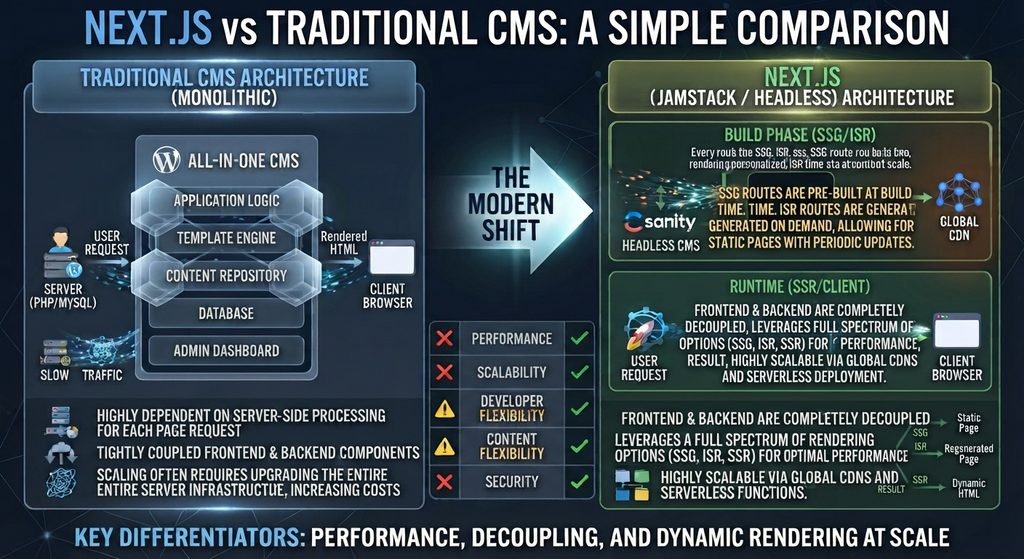
What Makes Next.js Different From a Traditional CMS
Most content management systems — WordPress, Drupal, Joomla — share a fundamental architecture: the CMS manages both the content and the rendering. You write a post in the CMS editor, the CMS stores it in a database, and when a visitor requests the page, the CMS retrieves the content and generates the HTML using its template system.
Next.js works differently in a way that matters for SEO. It is a React framework — not a CMS — that gives developers complete control over how content is fetched, how pages are rendered, and what HTML is delivered to the browser and to crawlers.
Not Client-Side React — A Critical Distinction
The most important thing to understand about Next.js for SEO is what it is not. It is not the same as building a React application with Create React App or Vite, where content is rendered client-side in the browser and AI crawlers receive an empty <div id="root">.
Next.js solves the client-side rendering problem at the framework level. By default — without any special configuration — Next.js pages render on the server and deliver complete HTML in the HTTP response. Developers who build with Next.js get React’s component model and developer experience without the crawlability penalty of client-side rendering.

The App Router and React Server Components
Next.js 13 introduced the App Router, which makes server rendering even more pervasive. With the App Router, React components are server components by default — they run on the server, fetch their data, render their HTML, and send the result to the browser without shipping any JavaScript to the client for those components.
This is architecturally significant for SEO and AI visibility. A page built with App Router components delivers:
- Full HTML content in the server response
- No hydration overhead for content components
- Smaller JavaScript bundles sent to the browser
- Faster Time to Interactive for users
- Complete content availability for all crawlers
Only interactive components — forms, dropdowns, state-dependent UI — are marked with "use client" and hydrated in the browser. Static and content-focused components stay entirely on the server.
File-Based Routing
Next.js uses the file system as its routing layer. A file at app/blog/[slug]/page.tsx automatically creates a route at /blog/[post-slug]. This produces clean, predictable URL structures without plugin configuration or manual permalink settings.
For SEO, clean URL structure matters for both canonicalization and internal linking legibility. For development teams, file-based routing means URL architecture decisions are made in the file system — visible, auditable, and version-controlled — rather than buried in CMS settings.
Built-In SEO Primitives
Next.js provides first-class support for the HTML elements that SEO depends on:
The Metadata API (App Router) generates <title>, <meta>, Open Graph, and Twitter card tags from a single exported object per page. Metadata is rendered server-side and appears in the raw HTML response — fully accessible to every crawler.
typescript
export const metadata = {
  title: 'Next.js for SEO: Complete Guide',
  description: 'How Next.js SSR and SSG deliver AI-crawlable HTML.',
  openGraph: {
    title: 'Next.js for SEO',
    type: 'article',
    publishedTime: '2026-01-15',
  },
}
The Image component (next/image) automatically optimizes images: serving WebP to browsers that support it, adding explicit width and height attributes to prevent layout shift, and lazy loading below-fold images without developer configuration.
Link prefetching for navigation links, automatic code splitting per route, and built-in support for robots.txt and sitemap.xml generation complete the framework’s SEO toolkit.
SSR, SSG, and ISR: Next.js Rendering Options for SEO
One of Next.js’s most valuable SEO characteristics is rendering flexibility. Different pages on the same site can use different rendering strategies, chosen based on each page’s specific content and update requirements.
Server-Side Rendering (SSR)
SSR in Next.js generates the complete HTML for a page on each request. The server fetches current data, renders the component tree, and returns a fully populated HTML document.
In the App Router, SSR is the default for any component that fetches data dynamically:
typescript
// app/products/[id]/page.tsx
export default async function ProductPage({ params }) {
  const product = await fetch(
    `https://api.example.com/products/${params.id}`,
    { cache: 'no-store' } // always fresh
  )
  const data = await product.json()
  return <ProductDetail product={data} />
}
Best for: Pages with content that changes frequently — pricing pages, inventory, news, real-time data. Content is always current when the crawler arrives.
Static Site Generation (SSG)
SSG pre-builds pages at deploy time. The framework generates complete HTML for every page during the build process, and those files are served directly from a CDN edge with no server computation at request time.
typescript
// app/blog/[slug]/page.tsx
export async function generateStaticParams() {
  const posts = await getAllPosts()
  return posts.map(post => ({ slug: post.slug }))
}
Best for: Blog posts, documentation, marketing pages, content that changes infrequently. Delivers the fastest possible TTFB — often under 50ms from CDN edge — which is ideal for both user experience and crawler efficiency.
Incremental Static Regeneration (ISR)
ISR combines static speed with content freshness. Pages are pre-built statically, but Next.js regenerates them in the background at defined intervals or when content changes are triggered via a revalidation webhook.
typescript
// Revalidate every 3600 seconds (1 hour)
export const revalidate = 3600
Best for: Content that changes periodically — product catalogues, frequently updated guides, high-traffic landing pages that need occasional updates without full rebuilds.
The SEO Rendering Decision Matrix
| Content Type | Update Frequency | Best Rendering | Why |
|---|---|---|---|
| Blog posts | Rarely | SSG | Maximum speed, full crawlability |
| Documentation | Monthly | SSG + ISR | Speed with periodic refresh |
| Product pages | Daily | ISR | Fresh without per-request cost |
| Pricing pages | Weekly | SSR or ISR | Accuracy critical |
| News/real-time | Continuous | SSR | Always current |
| Marketing pages | Rarely | SSG | Top performance, no overhead |
All three methods deliver complete HTML to crawlers. The choice between them is about performance optimization and content freshness — not about crawlability, which all three satisfy equally.
Performance Advantages That Directly Affect SEO
Automatic Code Splitting
Next.js splits JavaScript bundles by route automatically. When a user visits /blog/post-title, they download only the JavaScript needed for that specific page — not the JavaScript for every other page on the site.
For SEO, this matters through Core Web Vitals. A smaller JavaScript bundle means faster Time to Interactive, which affects Interaction to Next Paint (INP) — a Core Web Vitals metric. WordPress with multiple plugins loads a global JavaScript bundle on every page; Next.js loads only what each page needs.
Edge Runtime and Global CDN Delivery
Next.js supports an Edge Runtime that allows server-side rendering to run at CDN edge nodes — the physical server locations closest to the user. Instead of a request traveling from a visitor in Singapore to an origin server in Virginia, the page is rendered and served from a Singapore edge node.
For AI retrieval crawlers that operate globally and are speed-sensitive, edge rendering means consistently fast response times regardless of the crawler’s geographic origin. PerplexityBot serving a user in Europe receives the same sub-100ms TTFB as a user in the United States.
Deployed on Vercel — Next.js’s native platform — this edge rendering happens automatically with zero infrastructure configuration. Alternative platforms like Netlify offer similar edge deployment for Next.js.
Core Web Vitals by Default
Next.js’s built-in optimizations align directly with Core Web Vitals requirements:
| Core Web Vitals Metric | Next.js Feature | Impact |
|---|---|---|
| LCP (Largest Contentful Paint) | next/image, SSG + CDN | Faster image load |
| INP (Interaction to Next Paint) | Code splitting, partial hydration | Less JS blocking |
| CLS (Cumulative Layout Shift) | next/image enforces size attrs | No layout jump |
| TTFB (Time to First Byte) | Edge rendering, CDN | Fast first response |
A well-built Next.js site consistently achieves Lighthouse performance scores in the 90–100 range for content pages. Achieving the same scores with WordPress requires deliberate caching configuration, CDN setup, image optimization plugins, and ongoing maintenance. Next.js achieves it through framework architecture.
AI Visibility Benefits of Next.js
Complete HTML in Every Server Response
The fundamental AI visibility requirement is that content exists in the HTML response when the crawler arrives. Every Next.js rendering method — SSR, SSG, ISR — satisfies this requirement completely.
GPTBot, PerplexityBot, ClaudeBot, and OAI-SearchBot all receive complete, content-rich HTML on their first fetch. No JavaScript execution required. No Wave 2 rendering queue. No crawler timeout from slow responses.
For development teams switching from a client-side React application to Next.js, this is often the most immediately impactful change: content that was previously invisible to every AI crawler becomes fully accessible overnight.
Surgical Metadata Control
WordPress with Yoast or Rank Math provides per-page control over titles, descriptions, and Open Graph tags. Next.js provides the same control, but implemented in code rather than through a CMS interface — which means it can be programmatic, conditional, and fully tested.
A Next.js blog can generate metadata from post content automatically:
typescript
export async function generateMetadata({ params }) {
  const post = await getPost(params.slug)
  return {
    title: post.title,
    description: post.excerpt,
    authors: [{ name: post.author.name }],
    openGraph: {
      publishedTime: post.publishedAt,
      modifiedTime: post.updatedAt,
      type: 'article',
    },
  }
}
Every field is derived from the content itself, is guaranteed to be accurate, and is rendered server-side — reaching every crawler without JavaScript dependency.
Server-Side JSON-LD Schema
Schema markup in Next.js is implemented directly in page components, rendered server-side, and delivered in the HTML <head>. There is no plugin dependency, no JavaScript injection risk, and no possibility of schema failing to reach AI crawlers.
typescript
export default function BlogPost({ post }) {
  const schema = {
    '@context': 'https://schema.org',
    '@type': 'Article',
    headline: post.title,
    author: {
      '@type': 'Person',
      name: post.author.name,
    },
    datePublished: post.publishedAt,
    dateModified: post.updatedAt,
  }

  return (
    <>
      <script
        type="application/ld+json"
        dangerouslySetInnerHTML={{ __html: JSON.stringify(schema) }}
      />
      <article>{/* content */}</article>
    </>
  )
}
Because this is a server component, the <script> tag with the JSON-LD is present in the raw HTML response. GPTBot reads it on the first fetch. The schema is guaranteed to be accurate because it comes from the same data source as the page content.
Per-Crawler Rendering Control
This is a Next.js capability with no equivalent in WordPress — and it is particularly relevant for GEO.
AI crawlers and Googlebot have different rendering requirements. Googlebot can execute JavaScript and benefits from full SSR with rich interactive context. GPTBot and PerplexityBot are HTML-only parsers that benefit most from the lightest, fastest possible server response. Human visitors benefit from optimal interactivity and perceived performance.
In Next.js, you can differentiate rendering behavior based on the request’s user-agent, serving each crawler the response format it handles best:
typescript
// middleware.ts
import { NextResponse } from 'next/server'

export function middleware(request) {
  const ua = request.headers.get('user-agent') || ''
  const isAICrawler = /GPTBot|PerplexityBot|ClaudeBot/i.test(ua)

  if (isAICrawler) {
    // Rewrite to a pre-rendered static version
    return NextResponse.rewrite(
      new URL('/static' + request.nextUrl.pathname, request.url)
    )
  }
  return NextResponse.next()
}
WordPress has no mechanism for this. Its PHP rendering pipeline produces the same response for every request regardless of who is asking. Next.js middleware intercepts the request before rendering and can serve a stripped, pre-rendered HTML response to AI crawlers — maximizing content density and minimizing response time for the bots that matter most for citation.
This does not mean serving different content to crawlers and users — that is cloaking, which violates Google’s guidelines. It means serving the same content in a format optimized for the receiver: full interactive HTML for humans, lean pre-rendered HTML for AI parsers.
Dynamic Schema From Page Context
The existing JSON-LD section above shows Article schema generated from post data. Next.js takes this further: schema can be generated dynamically based on page type, URL parameters, and content structure — something WordPress plugins with fixed schema templates cannot match.
typescript
// Generate schema based on page type
function getSchema(page) {
  if (page.type === 'faq') {
    return {
      '@type': 'FAQPage',
      mainEntity: page.faqs.map(faq => ({
        '@type': 'Question',
        name: faq.question,
        acceptedAnswer: {
          '@type': 'Answer',
          text: faq.answer,
        },
      })),
    }
  }
  if (page.type === 'howto') {
    return {
      '@type': 'HowTo',
      name: page.title,
      step: page.steps.map((step, i) => ({
        '@type': 'HowToStep',
        position: i + 1,
        name: step.title,
        text: step.description,
      })),
    }
  }
  // Default Article schema
  return { '@type': 'Article', headline: page.title }
}
Every page gets exactly the schema type that matches its content — automatically, accurately, server-side. No manual schema configuration per post. No plugin template limitations.
Precise HTML Control for Citation Optimization
In WordPress, the HTML structure of your pages is determined by your theme, your page builder, and your plugins — a stack of third-party code you configure but don’t write. If the theme adds unnecessary wrapper divs around headings, you can work around it but you can’t fully control it.
In Next.js, developers write the HTML directly in React components. The heading hierarchy, the semantic landmark elements, the paragraph structure, the list markup — all of it is explicit and intentional. A Next.js team that has read Articles 3 and 7 of this series knows exactly what crawlers see, because they wrote the HTML that crawlers receive.
This level of control compounds over time. Every structural decision made for readability — clean heading hierarchies, semantic landmark elements, self-contained sections — is also a citation-optimization decision that improves AI discoverability.
Real-World Use Cases: Who Should Choose Next.js
SaaS Marketing Sites
The companies building the tools that developers use — Vercel, Linear, Loom, Clerk, Resend, Supabase — run their marketing sites on Next.js. The pattern is consistent: React expertise on the engineering team, need for high Lighthouse scores, and a marketing site that must perform as well as the product it sells.
For a SaaS company, the marketing site is a direct revenue driver. A 200ms improvement in page load speed measurable translates to conversion rate improvement. Next.js’s performance defaults justify the development investment for this use case.
Developer Documentation
Large documentation sites — particularly those for developer tools and APIs — benefit from Next.js’s SSG capabilities. Thousands of documentation pages can be pre-built and served from CDN edge with sub-100ms TTFB. Content search and navigation remain fully client-side interactive while page content is fully static and crawler-accessible.
Enterprise Product Pages
Enterprise companies with dedicated frontend teams use Next.js to maintain performance SLAs that WordPress with its plugin ecosystem cannot reliably guarantee. When a VP of Engineering sets a “no page slower than 200ms TTFB” standard, Next.js with edge rendering is the only web framework that can reliably meet it in production.
Content Platforms With Developer Publishing Teams
Technical publications, developer blogs, and content platforms where the publishing team consists of developers — and where content is managed through Git and MDX rather than a CMS editor — are natural Next.js fits. The authoring workflow is code-native, the build pipeline is automated, and the performance output is optimized by default.
The Honest Tradeoffs
Next.js is not the right platform for every team or every site. The advantages above are real — and so are these:
There is no built-in content management interface. Non-developer content teams cannot use Next.js without a separate headless CMS (Contentful, Sanity, Prismic, Payload). This adds system complexity, subscription cost, and integration maintenance.
The initial development investment is significant. A well-built Next.js site requires experienced React developers, a thoughtful rendering strategy per route, schema implementation in code, and CI/CD pipeline configuration. WordPress can be launched in a day; a production-quality Next.js site takes weeks.
The talent pool is smaller. WordPress developers are the most abundant web development resource globally. Senior Next.js developers with deep SEO knowledge are significantly harder to find and more expensive to hire.
Ongoing maintenance differs in character, not in volume. WordPress requires plugin updates, hosting management, and security monitoring. Next.js requires dependency management, build pipeline maintenance, and headless CMS integration upkeep. Neither platform maintains itself.
The platform decision comes down to a single question: does your team have — or can it hire — the React development expertise to build and maintain a Next.js site?
When Next.js Wins
Next.js delivers a structural advantage over WordPress in these specific scenarios:
| Scenario | Why Next.js Wins |
|---|---|
| High-traffic sites needing edge caching | Vercel/Cloudflare edge renders near the user; WordPress needs CDN config |
| Complex rendering requirements | Per-page SSR/SSG/ISR; WordPress has no equivalent |
| Personalized or dynamic content | SSR per-request with user context; WordPress caching breaks personalization |
| GEO-focused per-crawler optimization | Middleware can serve crawler-optimized responses; WordPress cannot |
| Teams with JavaScript/React expertise | Developers work in their native stack without plugin dependencies |
| Performance SLAs under 200ms TTFB | Edge runtime guarantees it architecturally; WordPress requires manual work |
The Right Approach for Most Teams
For teams that need both content management velocity and delivery performance, the recommended path is:
Start with WordPress for content volume and SEO plugin maturity. WordPress’s block editor, Rank Math schema, automatic sitemaps, and PHP rendering deliver everything needed for strong SEO and AI crawlability without development overhead.
Layer Next.js as a headless front end when rendering control becomes a competitive requirement. This gives you WordPress’s content management speed — non-developers publishing independently, editorial workflows, media library — with Next.js delivery performance and per-crawler rendering optimization.
This is the headless WordPress + Next.js architecture covered in Article 15. It is not the right starting point for most teams, but it is the right destination for teams that outgrow what a traditional WordPress front end can deliver.
That comparison is examined in detail in the next article.
Building a Next.js site and want to verify its AI crawlability and schema implementation before launch? The Answer Engine Visibility Diagnostic tests every public-facing route against all major AI crawlers, validates your JSON-LD schema, and checks Metadata API output against best practice — delivered automatically as a structured PDF report.
Next: Next.js vs WordPress: Which Platform Is Better for SEO and AI Search? →
← Previous: Common WordPress Mistakes That Hurt AI Discoverability
This article is part of a 20-article series on SEO, GEO, and AI Visibility. View the complete series →