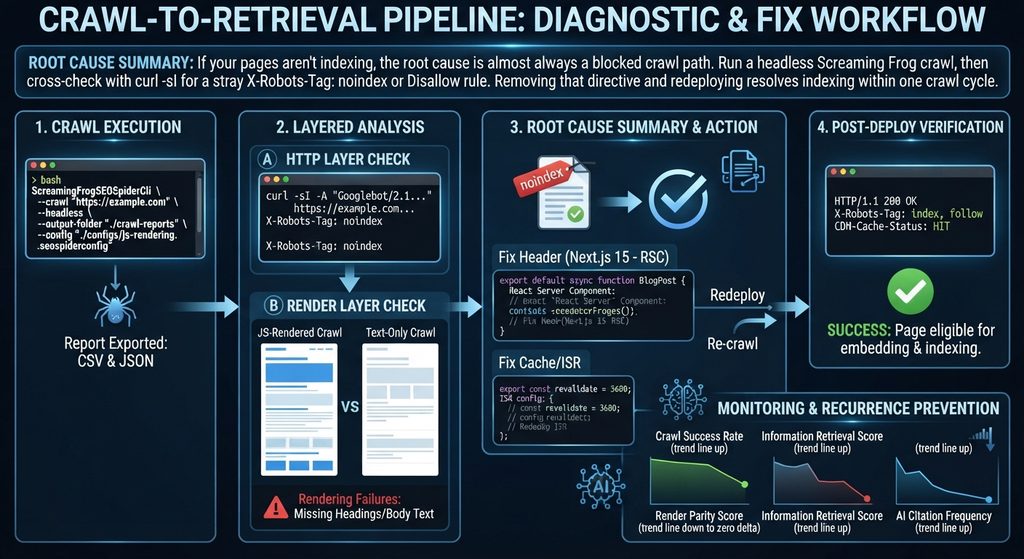
Root Cause Summary: If your pages aren’t indexing, the root cause is almost always a blocked crawl path. Run a headless Screaming Frog crawl, then cross-check with
curl -sIfor a strayX-Robots-Tag: noindexorDisallowrule. Removing that directive and redeploying resolves indexing within one crawl cycle.
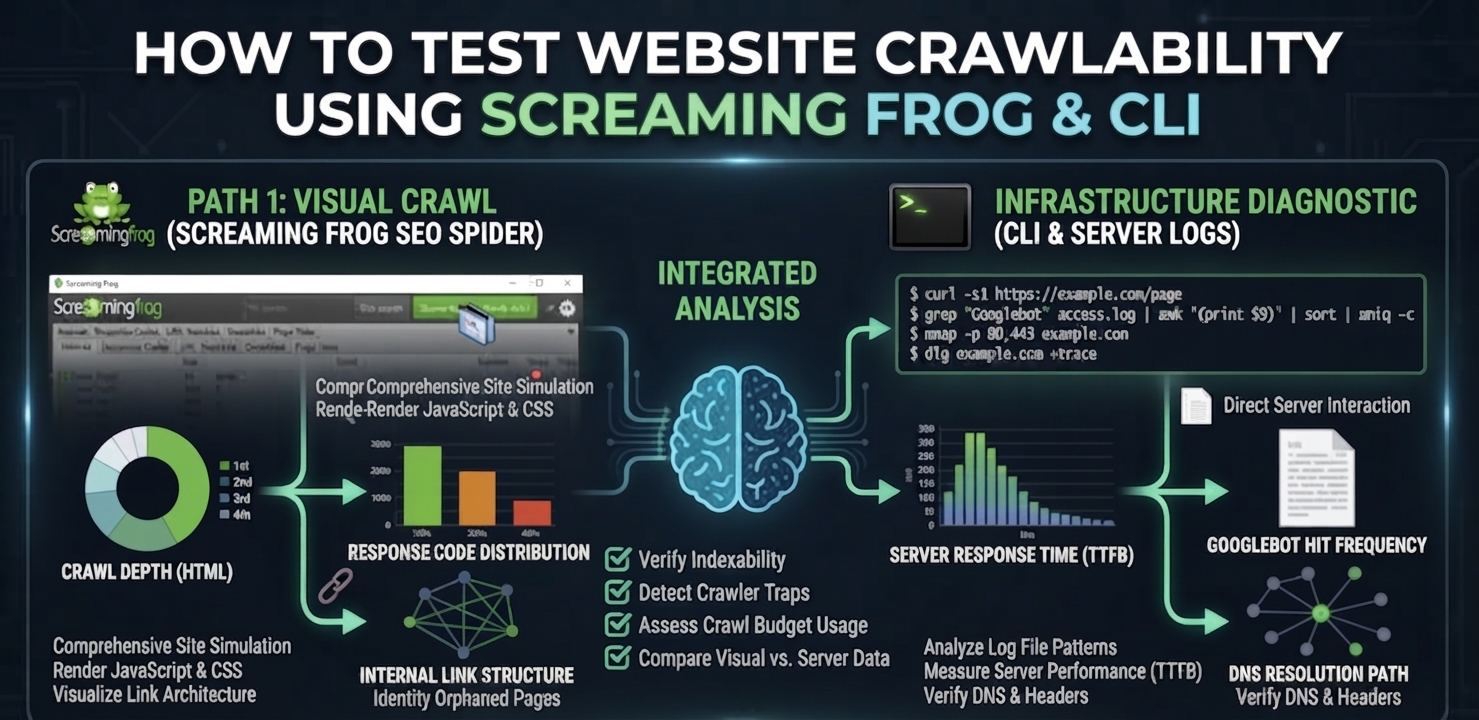
To test website crawlability means verifying, at the HTTP and DOM level, that a search engine or AI crawler can actually reach and parse the content you intend to rank—not assuming it can because the page loads fine in a browser. A page can render perfectly for a human and still be structurally invisible to a crawler if a header, a robots directive, or a rendering timeout is silently blocking it upstream. Screaming Frog and a small set of CLI tools give you the same view of the page a crawler gets, which is the only view that matters for diagnosis.
How Crawlers vs. AI Retrieval Systems Read Your Site
A crawl test exists to answer one question: Does the crawler receive the same content a browser renders? Search engines and LLM-based retrieval systems both depend on a clean fetch-render-extract sequence before anything downstream happens. If that sequence breaks, the page never reaches the stage where content is converted into vector embeddings and compared against query vectors using cosine distance—it simply never enters the retrieval corpus, regardless of content quality.
- Traditional Crawlers: Built their indexes primarily from server-rendered HTML—fast, deterministic, and cheap to process at scale.
- Modern Retrieval Pipelines: Layer a rendering and embedding step on top (including AI Overviews). Content is extracted, mapped against a knowledge graph of known entities, and clustered semantically so related concepts group together in vector space regardless of exact phrasing.
That extra step is exactly where crawlability failures do the most damage. A page that is technically reachable but slow to render, or blocked by a conflicting canonical tag, gets excluded before semantic clustering ever happens.
JS-Rendered Crawl vs. Text-Only Crawl: Spotting the Gap
When you test website crawlability, running Screaming Frog in JavaScript-rendering mode against the same URL in text-only mode exposes rendering failures directly. A large delta between the two crawls—missing headings, absent body text, empty meta tags in the text-only pass—tells you the crawler’s renderer is timing out or failing before your JavaScript populates the DOM. This is the single most common cause of pages that “look fine” but never get indexed.
Your crawlability test needs to check both layers—raw HTTP reachability and rendered-content completeness—because passing one and failing the other still results in a page that never earns an information retrieval score worth ranking on.
Step-by-Step Crawlability Test & Fix
Step 1: Run the Screaming Frog CLI Headless Crawl
This is the fastest way to test website crawlability and get a full report without opening the GUI—essential for CI pipelines or urgent incident checks.
Bash
# Headless crawl with JS rendering enabled, exported to CSV
ScreamingFrogSEOSpiderCli \
  --crawl "https://example.com" \
  --headless \
  --output-folder "./crawl-reports" \
  --export-tabs "Internal:All,Response Codes:Blocked by Robots.txt,Response Codes:Client Error 4xx" \
  --config "./configs/js-rendering.seospiderconfig" \
  --save-crawl
Step 2: Cross-Check Raw Response Headers Directly
Screaming Frog reports what it sees; curl confirms what the server is actually sending, byte for byte, with no rendering layer in between.
Bash
curl -sI -A "Googlebot/2.1 (+http://www.google.com/bot.html)" \
  https://example.com/blog/technical-seo/test-website-crawlability \
  | grep -Ei "^HTTP/|x-robots-tag|cache-control|location"
Step 3: Fix the Rendering Source in Next.js 15
If the JS-rendered crawl is missing content that the text-only crawl also misses, the fix belongs server-side. Render primary content as a React Server Component so it ships in the initial HTML payload rather than depending on client-side hydration to populate it.
TypeScript
// app/blog/[slug]/page.tsx — Next.js 15 App Router, React Server Component
export default async function BlogPost({ params }: { params: { slug: string } }) {
  const post = await getPostBySlug(params.slug); // resolved server-side, pre-render
  return (
    <article>
      <h1>{post.title}</h1>
      {/* Primary content is server-rendered — no client JS required for crawlers to read it */}
      <div dangerouslySetInnerHTML={{ __html: post.contentHtml }} />
    </article>
  );
}
Step 4: Configure Edge Caching and ISR
Configure edge caching and Incremental Static Regeneration (ISR) so re-crawls hit fresh, fast responses. A slow or stale response is functionally indistinguishable from a broken one to a time-boxed crawler.
TypeScript
// app/blog/[slug]/page.tsx — Incremental Static Regeneration config
export const revalidate = 3600; // regenerate at most once per hour
export async function generateStaticParams() {
  const posts = await getAllPostSlugs();
  return posts.map((slug) => ({ slug }));
}
Step 5: Confirm the Header Stack Post-Deploy
Verify that the crawler receives the expected production headers:
Plaintext
HTTP/1.1 200 OK
Content-Type: text/html; charset=UTF-8
Cache-Control: public, s-maxage=3600, stale-while-revalidate=86400
X-Robots-Tag: index, follow
CDN-Cache-Status: HIT
Common Failure Points & How to Patch Them
- Renderer timeout on JS-heavy pages: Screaming Frog’s JS-rendering mode defaults to a 5-second wait. If your critical content mounts after that window on a slow client bundle, the crawl will report it missing even though a real browser eventually shows it. Increase the rendered-page wait time in the crawl config during testing, but treat any dependency on that window as a production risk—search engine crawlers apply their own, often shorter, render budgets.
- Robots.txt crawl traps at scale: Large sites frequently disallow the wrong path pattern and unintentionally block category or pagination templates that hold real ranking value. Diff your
robots.txtagainst the “Blocked by Robots.txt” export from every crawl to catch regressions before they ship. - Canonical loops and redirect chains: A crawl that reports a high percentage of non-indexable URLs alongside redirect chains longer than two hops indicates a canonicalization or redirect-map error, not a content problem. Fix the chain before touching content.
Architecture Pipeline Reference
Plaintext
[ Screaming Frog / CLI Crawl ]
        │
        ▼
[ HTTP Layer Check ] ── curl / headers ── status, X-Robots-Tag, Cache-Control
        │
        ▼
[ Render Layer Check ] ── JS crawl vs text-only crawl ── DOM completeness diff
        │
        ▼
[ Pass? ] ──No──► Fix directive / RSC / ISR config ──► Redeploy ──► Re-crawl
        │
       Yes
        │
        ▼
[ Eligible for Embedding & Indexing ]
Preventing Recurrence & Tracking Crawl Health
Regularly learning how to test website crawlability is shifting from a one-time launch checklist item to a continuous monitoring discipline, run on every deploy rather than once per quarter. As more retrieval volume moves through embedding-based systems, a crawl failure doesn’t just cost a ranking position—it removes the page from the embedding pipeline entirely, which is a harder deficit to recover from than a ranking drop.
KPIs to Monitor After Every Deploy
- Crawl success rate: Percentage of submitted URLs returning a clean 200 with no conflicting robots directive, tracked per deploy.
- Render parity score: The content-completeness delta between JS-rendered and text-only crawls; target near-zero delta on priority templates.
- Information retrieval score: Recall@K against a benchmark query set, confirming that fixed pages are not just indexed but competitively retrievable.
- AI citation frequency: Whether previously blocked pages begin appearing as cited sources in AI Overview responses within 2–4 weeks of the fix shipping.
Frequently Asked Questions
How do I quickly test if my website is crawlable?
Run a headless Screaming Frog crawl against the URL, then confirm the raw response with curl using a Googlebot user agent. Compare the JS-rendered crawl against a text-only crawl to check for missing content, and inspect headers for a conflicting noindex or disallow directive.
Why does Screaming Frog show a page as non-indexable?
This usually means the crawl detected a noindex meta tag, an X-Robots-Tag header, a canonical tag pointing to a different URL, or a robots.txt disallow rule matching the page’s path. Check each signal individually since any one of them overrides the others.
Can I test crawlability without the Screaming Frog GUI?
Yes. Screaming Frog’s CLI mode supports headless crawls that export the same reports as the desktop app, which makes it suitable for CI/CD pipelines and scripted checks run automatically on every deploy.
How long after fixing a crawlability issue will the page get re-indexed?
Once the blocking directive or rendering issue is resolved and redeployed, most sites see a re-crawl within a few days if crawl budget and sitemap submission are healthy. Requesting reindexing directly in Search Console can accelerate discovery of the fix.
Get a Full Crawlability & Indexation Diagnostic
A single-URL test fixes one page. If the same failure pattern exists across templates, it’s costing you crawl budget site-wide. Run a deep crawlability diagnostic to find every blocked, misrendered, or crawl-budget-wasting URL on your domain—not just the one you noticed.
Leave a Reply