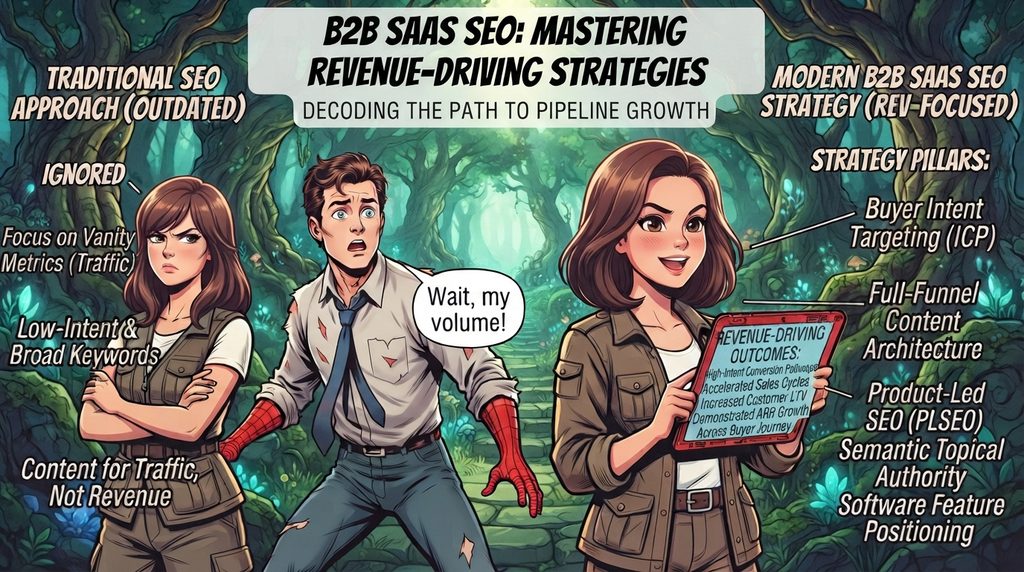
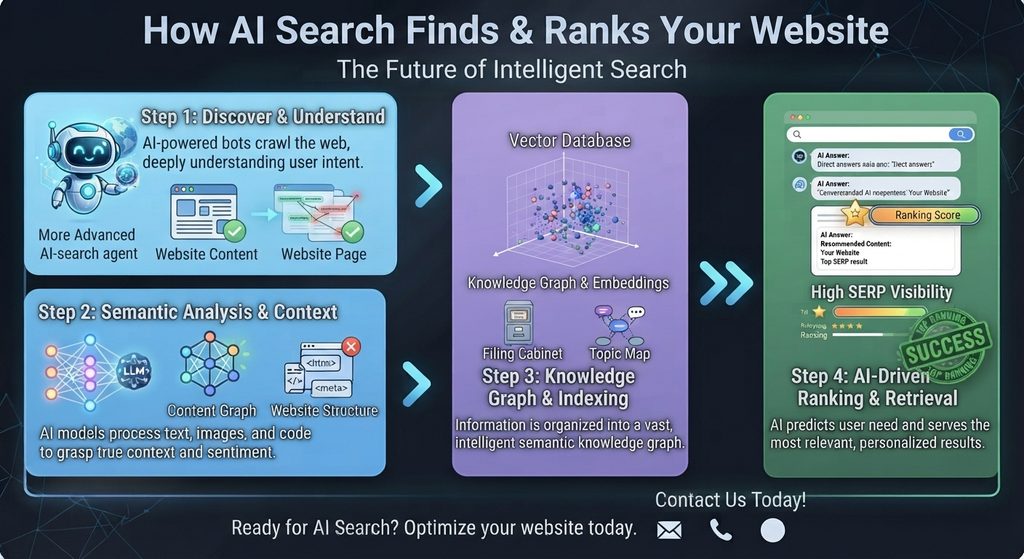
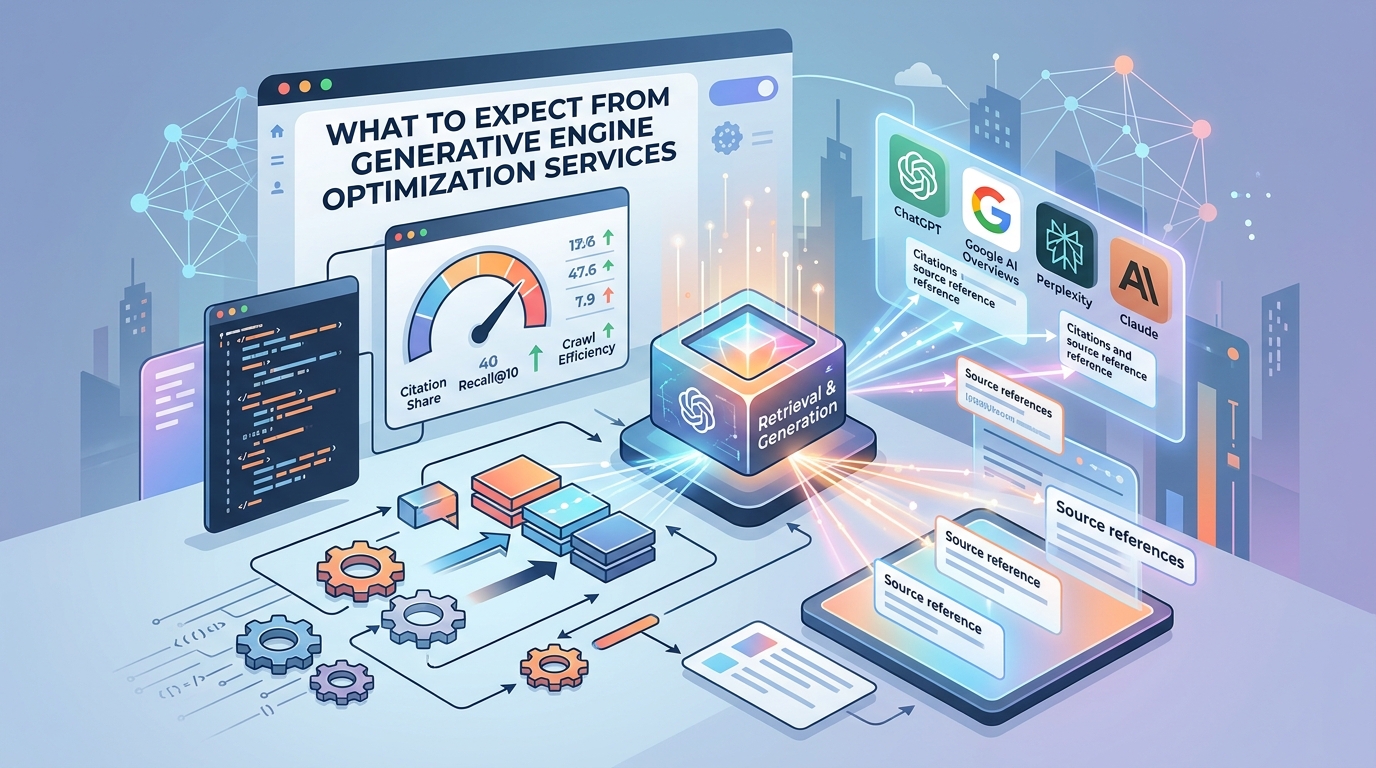
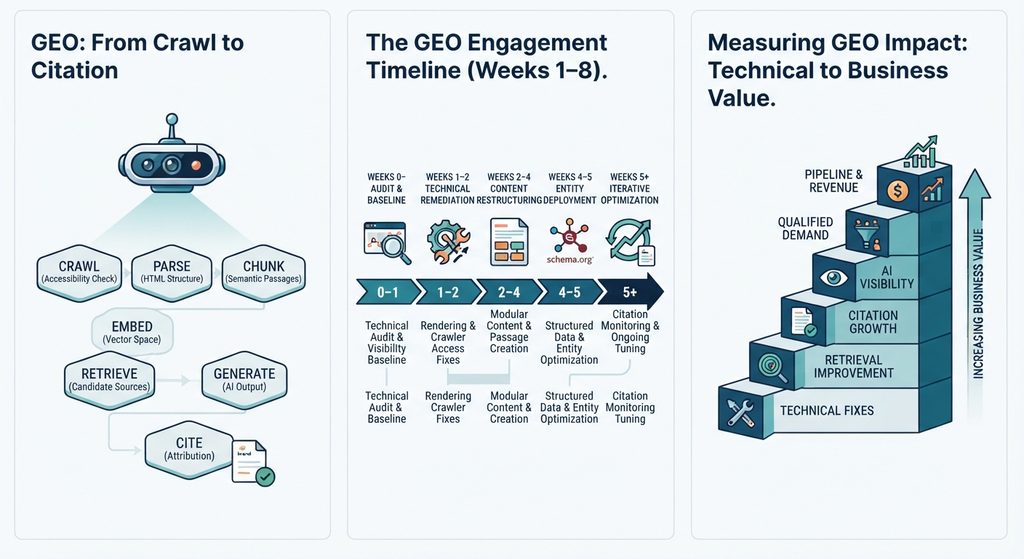
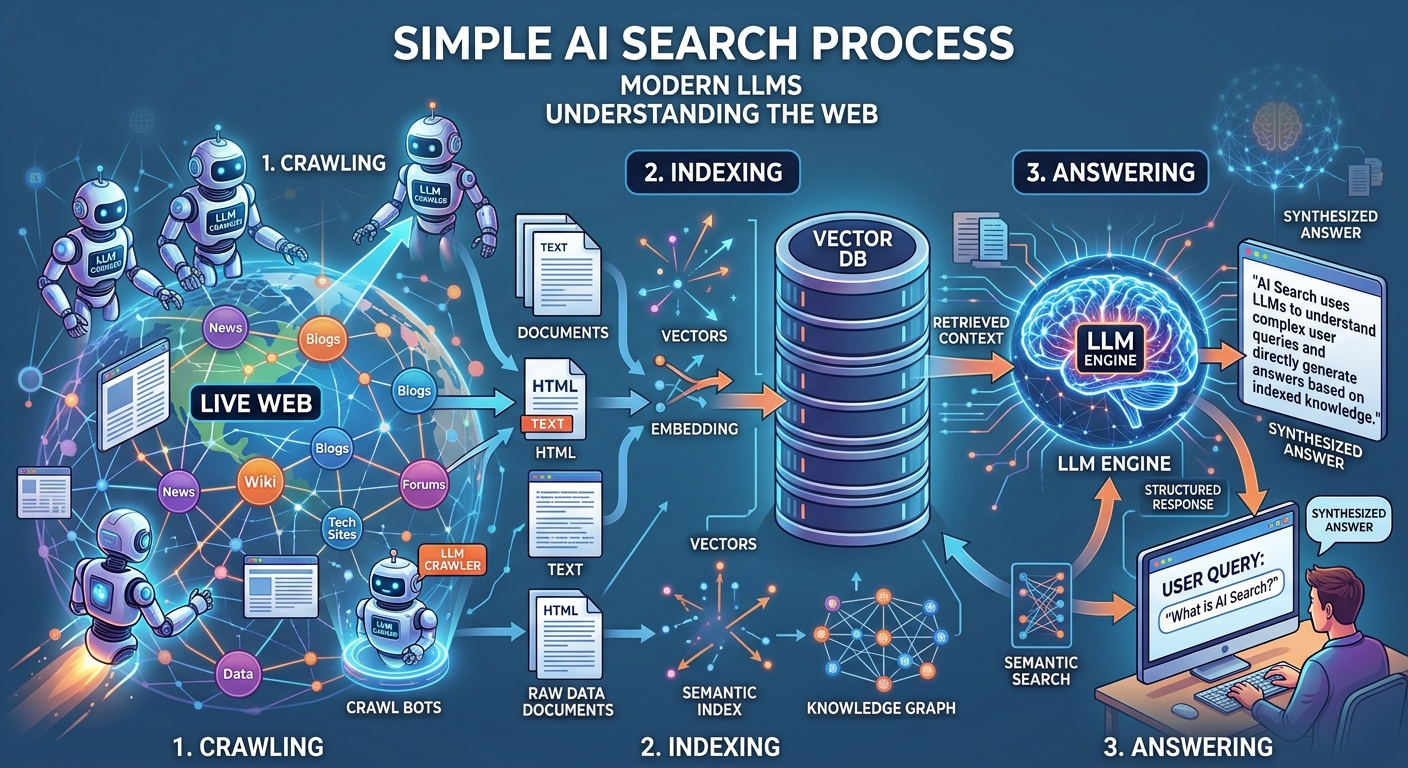
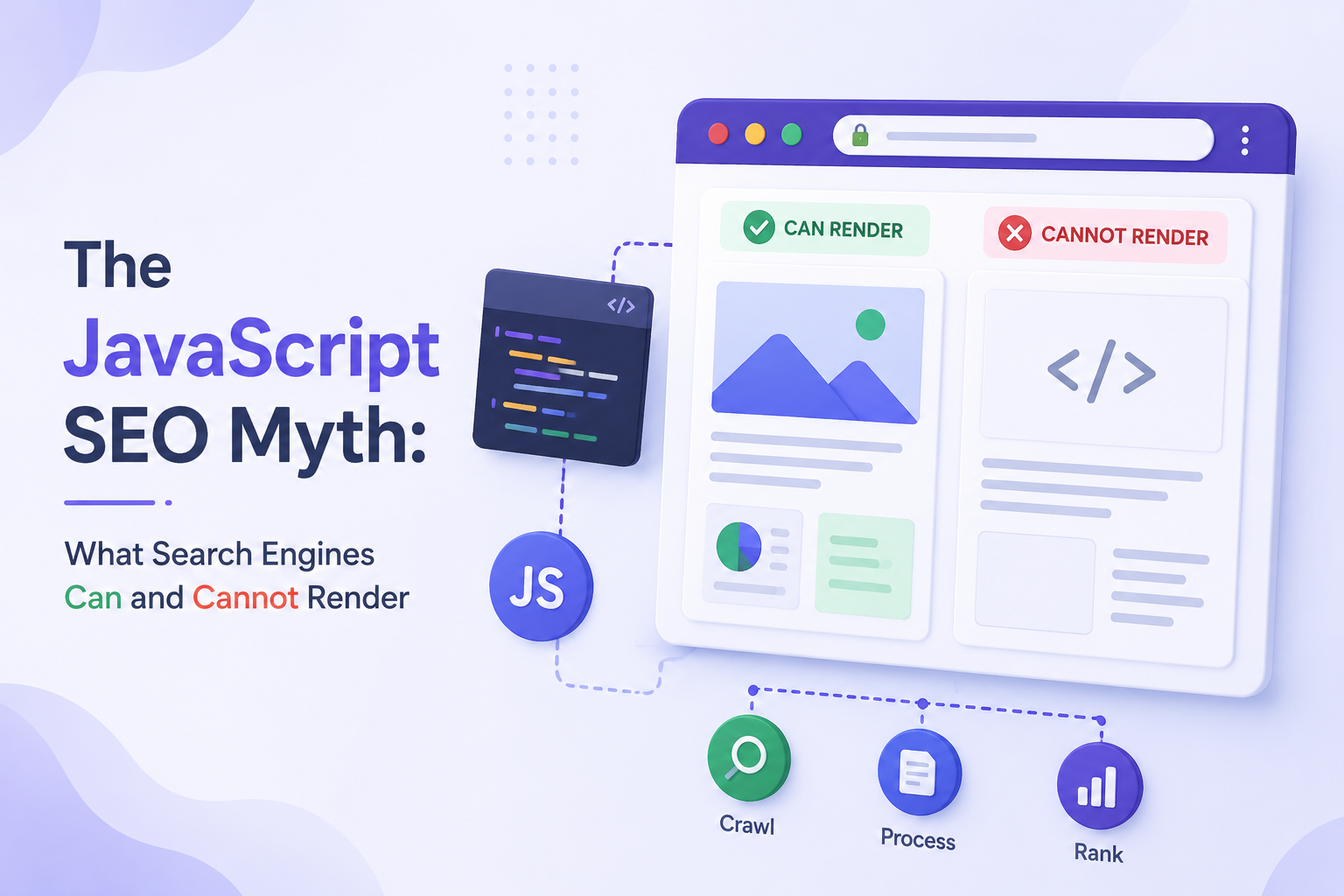
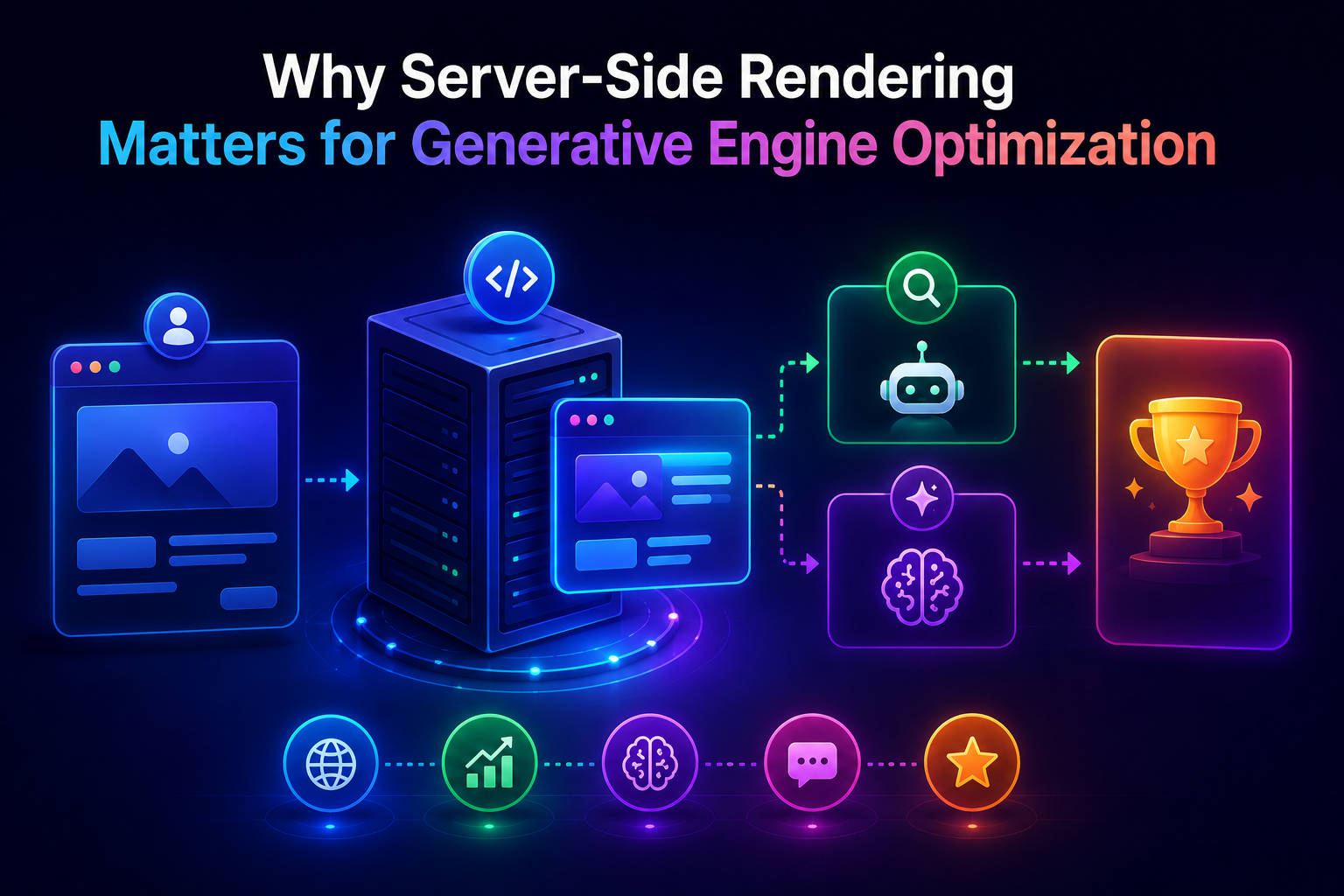
Search engines and LLM-based answer engines treat B2B SaaS SEO as a specialized discipline distinct from general content marketing or traditional web optimization. While standard search strategies prioritize broad traffic volume, an effective B2B SaaS SEO strategy focuses on high-intent conversion pathways, software feature positioning, and building semantic topical authority across the modern buyer journey.
This revised B2B SaaS SEO Guide incorporates dedicated Business Use-Case Frameworks alongside technical optimization and revenue alignment to turn organic search into a direct engine for pipeline and ARR Growth.
1. How Modern Search Engines & AI Answer Engines Evaluate B2B SaaS Content
[ Business Search Intent ] ──► Semantic Proximity (Vector Space) ──► Extraction of Structured Use Cases & Entities
For a B2B SaaS SEO Guide to drive actual revenue, the primary objective is to optimize specific passages, software feature definitions, business use cases and integration hubs so that both traditional search engines and AI answer engines extract them as direct answers.
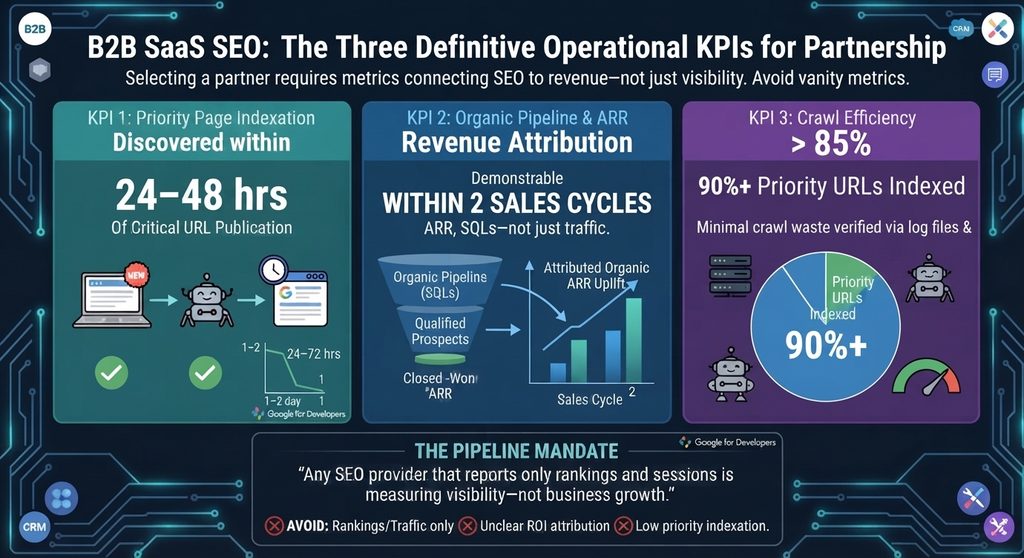
Core Benchmarks for B2B SaaS SEO
Indexation Speed: New use-case and feature pages should achieve a page-to-index latency under 48 hours.
Pipeline Attribution: Measurable pipeline and ARR uplift attributable to organic touchpoints within two sales cycles.
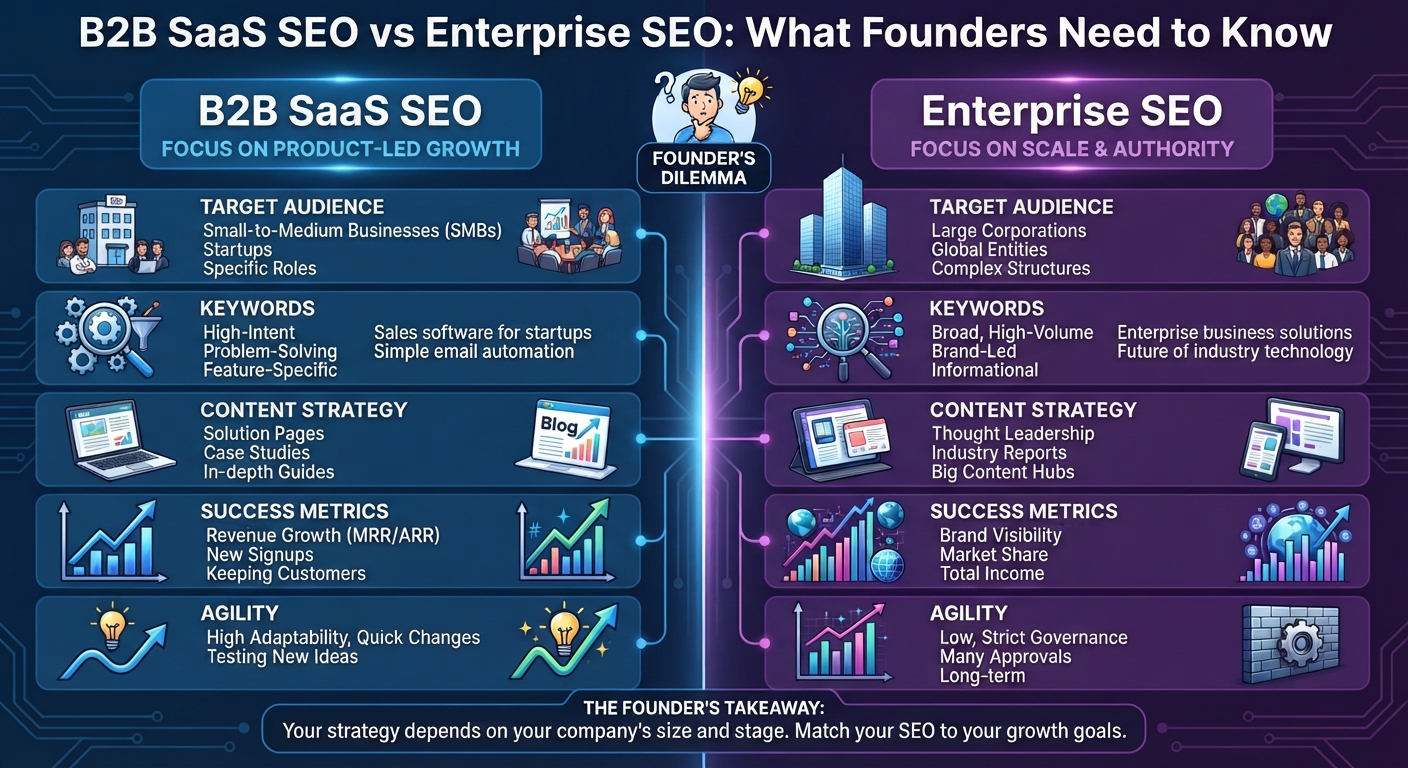
2. B2B SaaS SEO vs. Enterprise SEO: Strategic Differences
While B2B SaaS SEO focuses on low-friction conversion velocity, semantic coverage, and targeted topical authority, Enterprise SEO manages multi-domain architecture and crawl distribution across tens of thousands of URLs.
Dimension
B2B SaaS SEO
Enterprise SEO
Primary Focus
Semantic coverage & intent mapping on lean site structures (50–2,000 pages).
Crawl budget distribution and technical architecture across massive environments (10,000+ pages).
Conversion Funnel
Direct touchpoint for high-intent Bottom-of-Funnel (BOFU) trial and demo signups.
Top-of-Funnel (TOFU) brand reach, rarely tied to last-touch conversion.
Technical Priority
Fast indexation, structured data, and server-side rendering (SSR/SSG).
Managing duplicate content, faceted navigation, and cross-domain fragmentation.
Velocity & Scale
Continuous publication of use-case, comparison, and integration pages.
Governance, template integrity, and global localization updates.
Ana Precup is an International SEO and AI Search Consultant focusing on revenue-driven SEO strategy. Connect with Ana Precup on LinkedIn.
3. High-Intent Content Frameworks: Integrating Business Use Cases
Machine-Readable Structured Data (JSON-LD)
A B2B SaaS SEO strategy generates the highest return on investment when content directly targets buyers near the point of purchase.
Business use-case pages map platform capabilities directly to specific buyer personas, job roles (e.g., CFO, IT Director, Sales Operations), and vertical industries.
Role-Based Alignment: Address specific operational friction points for distinct decision-makers (for instance, showing financial governance for a CFO vs. raw data accessibility for an analyst).
Problem-Solution Mapping: Frame software features as direct solutions to high-value business challenges rather than listing passive product specifications.
Vertical Specialization: Create dedicated landing pages for specific industries (e.g., Healthcare, Fintech, Manufacturing) to capture long-tail, low-competition commercial searches
B. Product Alternative & Comparison Pages
Targets high-commercial intent queries (e.g., “Competitor “A” vs Competitor “B”) to capture buyers actively evaluating switching options.
C. Integration Directories & Ecosystem Hubs
Captures users looking for software that connects with their existing tech stack. Organizing integrations into a hub-and-spoke UX architecture with clear trigger/action lists and ItemList schema enhances both usability and engine extraction.
4. Technical Infrastructure & Structured Data Schema
A successful B2B SaaS SEO implementation relies on robust technical infrastructure, precise structured data markup, and pre-rendered frontends to minimize extraction friction for AI crawlers.
A. Machine-Readable Structured Data (JSON-LD)
Schema markup provides standardized signals that allow search engines and LLMs to explicitly categorize software applications, services, and commercial offers.
1. SoftwareApplication Schema for Core Products & Use Cases
Using SoftwareApplication or WebApplication schema explicitly defines operating systems, application categories (e.g., BusinessApplication), pricing tiers, and rating aggregates.
2. Service Schema for B2B Solution Offerings
Service schema identifies specialized business offerings and links them to the primary organization.
B. Frontend Rendering Optimization
Many SaaS marketing sites utilize dynamic JavaScript frameworks like Next.js or React. To ensure search crawlers parse content immediately without relying on client-side JavaScript execution, enforce static generation (SSG) or server-side rendering (SSR).
5. Aligning Business Use Cases with Revenue: ARR Growth
Traditional search marketing focuses on surface-level metrics like raw traffic or keyword ranks. High-performing B2B SaaS SEO connects business use-case acquisition directly with ARR Growth and customer acquisition economics.
What is ARR Growth & How Is It Calculated?
Annual Recurring Revenue (ARR) Growth measures the percentage increase in a subscription software business’s predictable, annualized revenue over a given period.
Organic search strategy impacts every component of the Net New ARR equation
$$\text{Net New ARR} = \text{New Business ARR} + \text{Expansion ARR} – \text{Churned ARR} – \text{Contraction ARR}$$
New Business ARR: Direct acquisition of new subscription customers through high-intent landing pages, business use cases, and comparison content.
Expansion ARR: Revenue gained when existing customers upgrade plans or add seats—supported by product education hubs, use-case documentation, and feature guides.
Churned & Contraction ARR: Revenue lost from cancellations or downgrades, which search-driven onboarding resources and help documentation help mitigate.
6. Measuring Success: Modern B2B SaaS SEO KPIs
Evaluating a B2B SaaS SEO Guide program requires monitoring metrics tied directly to pipeline generation and brand visibility.
Time-to-Index: The time elapsed from publishing a use-case page to indexation in Google Search Console (Target: <48 hours).
AI Overview Citation Rate: The percentage of targeted software queries where your brand domain is explicitly cited inside AI-generated search answers.
Organic-to-Trial/Demo CVR: The percentage of organic search visitors who initiate a free trial or schedule a demo.
ARR Pipeline Attribution: Closed-won revenue and pipeline tracked via multi-touch CRM attribution models.
An SEO migration checklist provides a structured framework for transferring a website to a new domain, web host, CMS, or URL structure without sacrificing organic search traffic, keyword rankings, or search engine indexation. It spans pre-launch planning, technical redirect setups, content mapping, and post-launch auditing to ensure search crawlers and AI answer engines seamlessly transfer ranking signals to your new destination pages.
How Search Engines & AI Read Your Site During an SEO Migration
Following a strict SEO migration checklist starts with understanding how search crawlers and AI answer engines process structural web updates. Search engines process page indexing separately from page crawling. When URLs change, search engines evaluate destination paths in a temporary queue before transferring legacy ranking signals.
Modern search engines parse pages as Vector Embeddings (digital math maps of page content). If page copy, DOM layouts, or header hierarchies change drastically during a site move, the Cosine Distance (difference score) between old and new vectors increases. A high distance score signals that the target page is not an exact match, dropping search rankings and AI citations.
+-------------------+      301/308 Edge Rewrite      +-------------------+
|  Old Page URL     | -----------------------------> |  New Page URL     |
+-------------------+                                +-------------------+
          |                                                    |
   (Page Math Map)                                      (Page Math Map)
          v                                                    v
+-------------------+         Content Math Match             +-------------------+
|   Old Page Content| <====================================> |  New Page Content |
|     Embedding     |         (Match Score > 0.98)           |     Embedding     |
+-------------------+                                +-------------------+
Word Matching vs Smart Search in an SEO Migration Checklist
Executing an SEO migration checklist requires balancing traditional word indexing with modern dense retrieval models. A URL’s Information Retrieval Score depends on user engagement, backlink authority, vector embeddings, and entity relationships inside Knowledge Graphs.
To keep your Semantic Clustering (topic grouping) intact during a site migration, follow these two core checklist rules:
Clean Link Transfers: Deploy explicit 1:1 301 Moved Permanently or 308 Permanent Redirect response codes. Avoid 302 Found codes, as they signal temporary moves and keep legacy URLs in search indexes.
Keep Topic Groups Intact: Changing folder paths without connecting parent and child pages weakens your topical clusters, stripping authority from surrounding content.
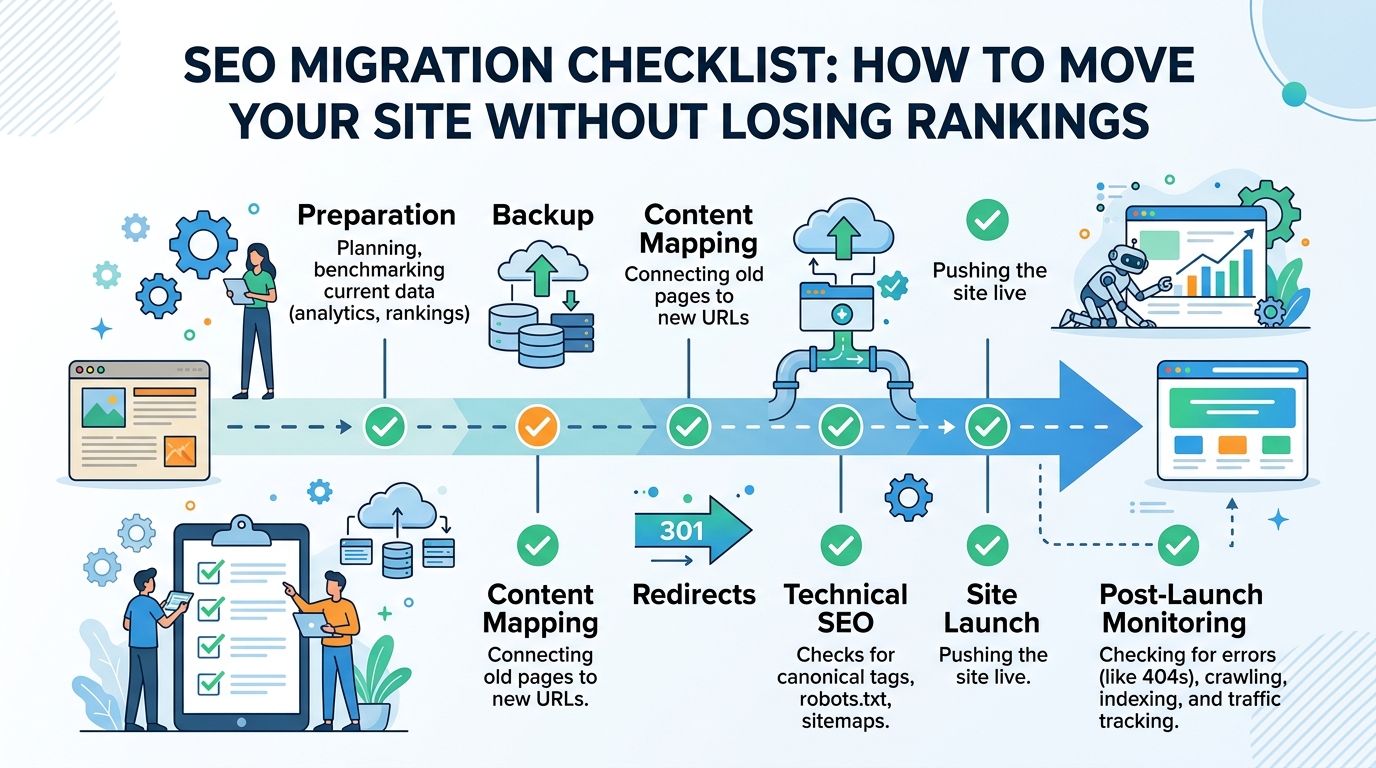
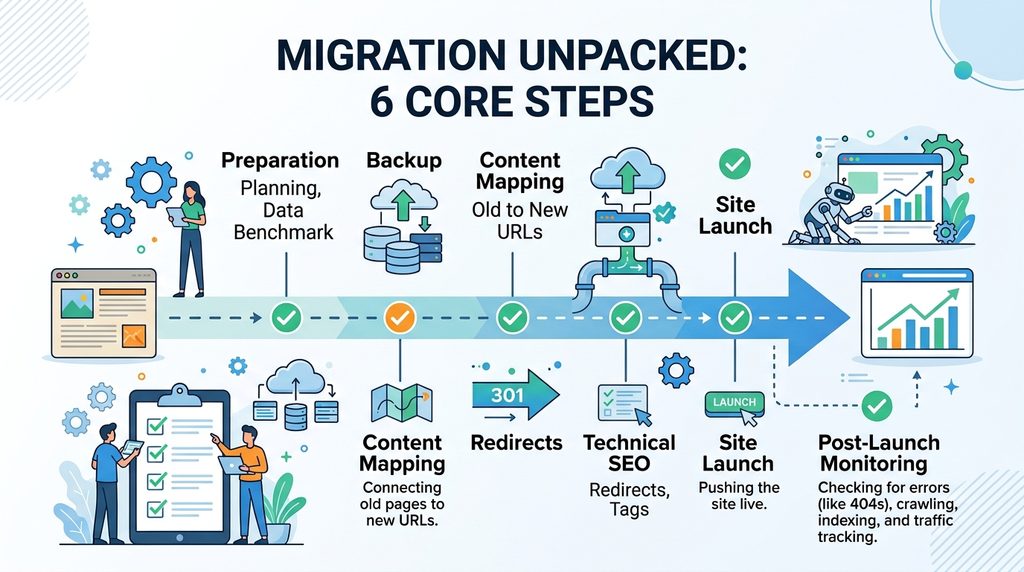
Step-by-Step SEO Migration Checklist: The 6 Core Steps
Audit your current website structure before making any code changes. Export all active URLs, top-performing landing pages, and historical traffic benchmarks to set your baseline.
Step 2: Data & Asset Backup
Perform a full backup of your existing site database, media library, server configurations, and current XML sitemaps to ensure zero data loss if cutover rollback is required.
Step 3: Content Mapping (Old URLs to New URLs)
Build a complete 1:1 mapping table matching every legacy URL directly to its corresponding new destination path to avoid broken links and maintain topical authority.
Step 4: Technical SEO & Redirect Setup
Implement 301 or 308 edge redirect rules on your web server or CDN. Update self-referencing canonical tags on target pages and check open-graph metadata before going live.
Step 5: Site Launch & Cutover Execution
Update DNS settings to point to your new infrastructure, submit updated XML sitemaps via search engine consoles, and run the Google Search Console Change of Address tool.
Step 6: Post-Launch Monitoring & Audit
Continuously parse real-time server access logs for 301, 200, and 404 status codes. Track indexation progress and benchmark rankings to ensure zero traffic loss.
Technical Server Setup & Code Examples
Handle all redirect rules at the server or CDN edge level to prevent slow page load speeds (TTFB latency spikes).
1. Nginx Fast 1:1 Redirect Setup (nginx.conf)
Nginx
# Production 301 Redirect Engine for Path & Subdomain Alignment
server {
    listen 443 ssl http2;
    server_name oldsite.domain.com;

    ssl_certificate /etc/letsencrypt/live/oldsite.domain.com/fullchain.pem;
    ssl_certificate_key /etc/letsencrypt/live/oldsite.domain.com/privkey.pem;

    # Maps legacy paths directly to new domain paths
    location / {
        return 301 https://ahsanweb.com$request_uri;
    }
}
// Edge-based 301/308 Mapping Engine for Enterprise Migrations
const redirectMap = new Map([
  ["/old-service-page", "https://ahsanweb.com/services/seo-migration-services"],
  ["/blog/legacy-post", "https://ahsanweb.com/blog/seo-migration/how-to-do-seo-migration"]
]);

addEventListener("fetch", (event) => {
  event.respondWith(handleRequest(event.request));
});

async function handleRequest(request) {
  const url = new URL(request.url);
  const target = redirectMap.get(url.pathname);

  if (target) {
    return Response.redirect(target, 301);
  }

  return fetch(request);
}
3. Comparing Site Migration Checklist Frameworks
Migration Type
Risk Level
Speed Impact
Rank Transfer Time
Setup Difficulty
New Domain Name (1:1)
Medium
Very Fast (< 5ms)
7–14 Days
Easy (DNS + Rewrite Rules)
New Web Platform (CMS)
High
Normal (10ms–50ms)
14–30 Days
Hard (Code & Schema Fixes)
HTTP to HTTPS Move
Low
None (0ms)
3–7 Days
Easy (Server Settings)
Folder Structure Change
High
Very Fast (< 5ms)
14–21 Days
Medium (Pattern Matching)
Full Content Redesign
Critical
Varies
30–90 Days
Very Hard (Content Remapping)
Common Mistakes in an SEO Migration Checklist & Fixes
Multiple Redirect Hops: Redirecting Page A $\rightarrow$ Page B $\rightarrow$ Page C slows load speed and loses ~15% backlink value per step. Map every old URL directly to its final destination.
Canonical Tag Clashes: Every new target page requires a self-referencing canonical tag (<link rel="canonical" href="[https://ahsanweb.com/new-page](https://ahsanweb.com/new-page)" />). Mismatched canonicals force search engines to ignore redirect instructions.
Wrong Page Redirects (Soft 404s): Redirecting deleted or irrelevant links to your homepage causes Soft 404 errors in Google Search Console. Map legacy links to their closest structural category node.
Tracking Long-Term Success with an SEO Migration Checklist
Traffic & Revenue Protection Table
+-------------------------------------------------------------------------+
|                  POST-MIGRATION CHECKLIST MATRIX                        |
+------------------------------------+------------------------------------+
| Standard Search Checks             | AI & Smart Search Checks           |
+------------------------------------+------------------------------------+
| • Google Indexing Rate (> 98%)     | • Perplexity Answer Citations      |
| • Fast Server Response (< 100ms)   | • ChatGPT Search Context Match     |
| • Kept Search Traffic (> 95%)      | • Google AI Overview Inclusion     |
| • Strong Backlink Pass-Through     | • Knowledge Graph Connectivity     |
+------------------------------------+------------------------------------+
Step 3 (Content Mapping): Create a 1:1 path mapping table to eliminate broken link chains.
Step 4 (Technical SEO): Apply 301/308 redirect rules at the server/CDN edge layer.
Step 5 (Site Launch): Submit dual XML Sitemaps (Old 301s + New 200 OKs) and use Search Console Change of Address.
Step 6 (Monitoring): Parse web server logs daily for 301 success codes and 404 errors.
Frequently Asked Questions
Why is an SEO migration checklist necessary during a website redesign?
An SEO migration checklist ensures that all URL structures, canonical tags, server redirect rules, and XML sitemaps are verified so search engines transfer existing ranking authority without organic traffic loss.
What is the difference between a 301 and 308 redirect in an SEO migration checklist?
A 301 redirect marks a permanent move but may allow legacy HTTP clients to change POST requests to GET. A 308 redirect strictly preserves original POST data across modern web applications.
How long does Google take to transfer rankings after following an SEO migration checklist?
Ranking transfers typically take 7 to 30 days for small-to-medium platforms, and up to 90 days for large enterprise platforms with complex URL structures.
Need Help Moving Your Site Without Traffic Losses?
Protect your domain authority, preserve organic revenue streams, and secure AI answer engine citations during your site migration.
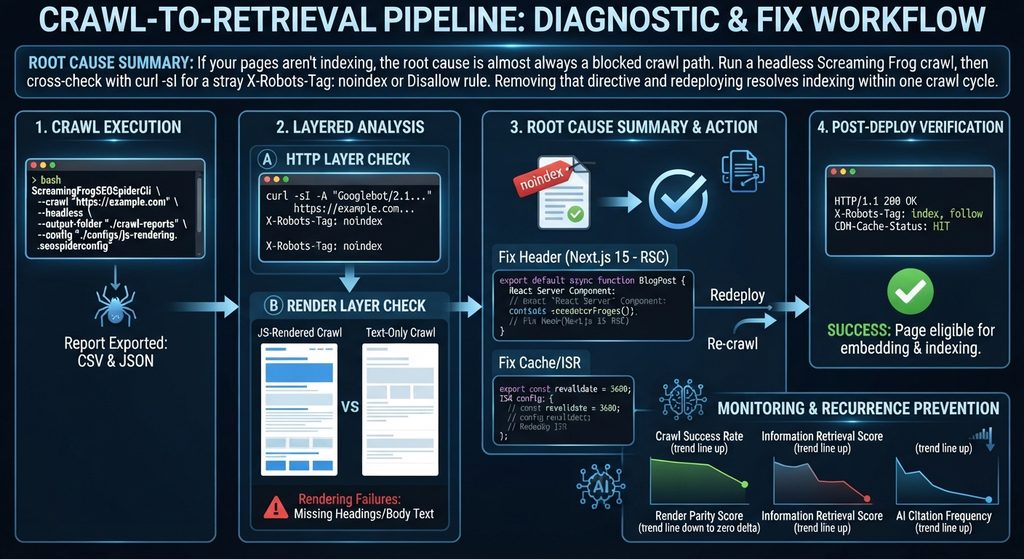
Root Cause Summary: If your pages aren’t indexing, the root cause is almost always a blocked crawl path. Run a headless Screaming Frog crawl, then cross-check with curl -sI for a stray X-Robots-Tag: noindex or Disallow rule. Removing that directive and redeploying resolves indexing within one crawl cycle.
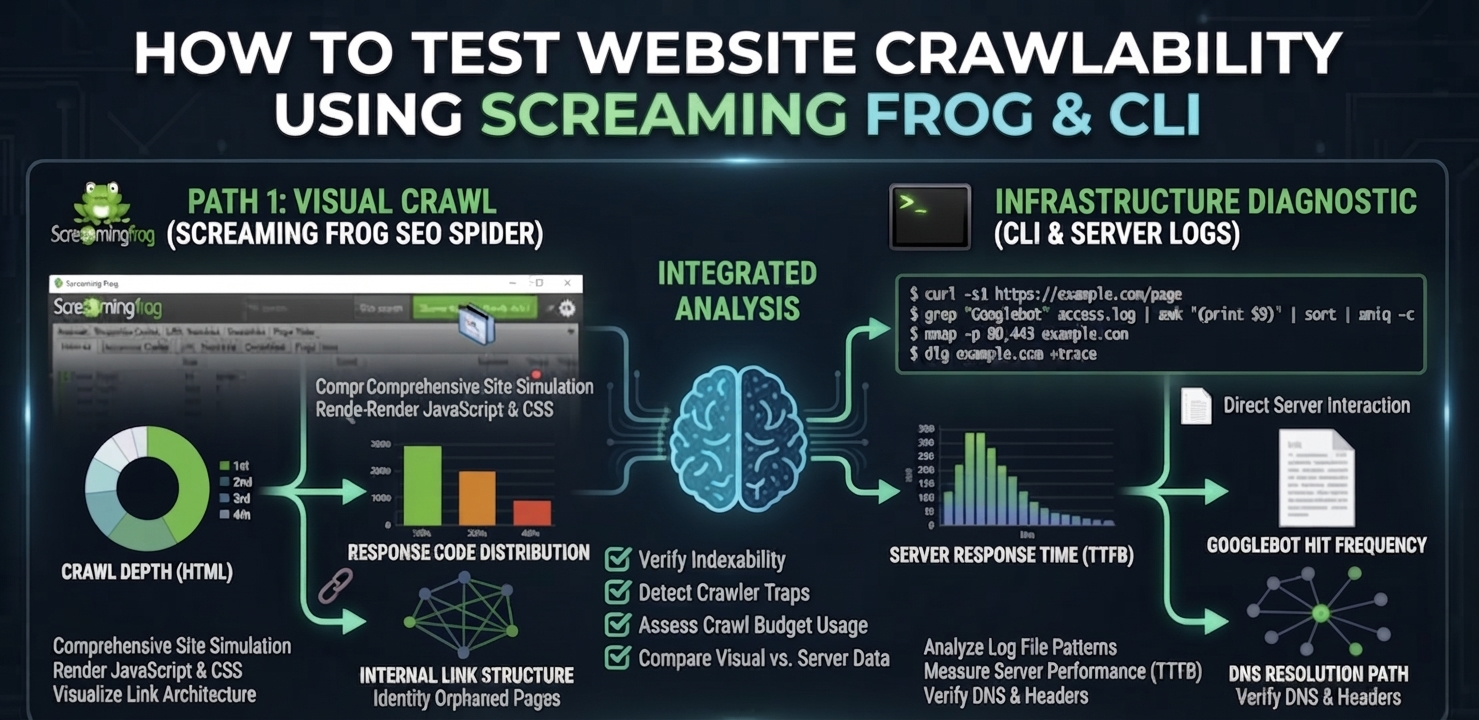
To test website crawlability means verifying, at the HTTP and DOM level, that a search engine or AI crawler can actually reach and parse the content you intend to rank—not assuming it can because the page loads fine in a browser. A page can render perfectly for a human and still be structurally invisible to a crawler if a header, a robots directive, or a rendering timeout is silently blocking it upstream. Screaming Frog and a small set of CLI tools give you the same view of the page a crawler gets, which is the only view that matters for diagnosis.
How Crawlers vs. AI Retrieval Systems Read Your Site
A crawl test exists to answer one question: Does the crawler receive the same content a browser renders? Search engines and LLM-based retrieval systems both depend on a clean fetch-render-extract sequence before anything downstream happens. If that sequence breaks, the page never reaches the stage where content is converted into vector embeddings and compared against query vectors using cosine distance—it simply never enters the retrieval corpus, regardless of content quality.
Traditional Crawlers: Built their indexes primarily from server-rendered HTML—fast, deterministic, and cheap to process at scale.
Modern Retrieval Pipelines: Layer a rendering and embedding step on top (including AI Overviews). Content is extracted, mapped against a knowledge graph of known entities, and clustered semantically so related concepts group together in vector space regardless of exact phrasing.
That extra step is exactly where crawlability failures do the most damage. A page that is technically reachable but slow to render, or blocked by a conflicting canonical tag, gets excluded before semantic clustering ever happens.
JS-Rendered Crawl vs. Text-Only Crawl: Spotting the Gap
When you test website crawlability, running Screaming Frog in JavaScript-rendering mode against the same URL in text-only mode exposes rendering failures directly. A large delta between the two crawls—missing headings, absent body text, empty meta tags in the text-only pass—tells you the crawler’s renderer is timing out or failing before your JavaScript populates the DOM. This is the single most common cause of pages that “look fine” but never get indexed.
Your crawlability test needs to check both layers—raw HTTP reachability and rendered-content completeness—because passing one and failing the other still results in a page that never earns an information retrieval score worth ranking on.
Step-by-Step Crawlability Test & Fix
Step 1: Run the Screaming Frog CLI Headless Crawl
This is the fastest way to test website crawlability and get a full report without opening the GUI—essential for CI pipelines or urgent incident checks.
If the JS-rendered crawl is missing content that the text-only crawl also misses, the fix belongs server-side. Render primary content as a React Server Component so it ships in the initial HTML payload rather than depending on client-side hydration to populate it.
TypeScript
// app/blog/[slug]/page.tsx — Next.js 15 App Router, React Server Component
export default async function BlogPost({ params }: { params: { slug: string } }) {
  const post = await getPostBySlug(params.slug); // resolved server-side, pre-render
  return (
    <article>
      <h1>{post.title}</h1>
      {/* Primary content is server-rendered — no client JS required for crawlers to read it */}
      <div dangerouslySetInnerHTML={{ __html: post.contentHtml }} />
    </article>
  );
}
Step 4: Configure Edge Caching and ISR
Configure edge caching and Incremental Static Regeneration (ISR) so re-crawls hit fresh, fast responses. A slow or stale response is functionally indistinguishable from a broken one to a time-boxed crawler.
TypeScript
// app/blog/[slug]/page.tsx — Incremental Static Regeneration config
export const revalidate = 3600; // regenerate at most once per hour
export async function generateStaticParams() {
  const posts = await getAllPostSlugs();
  return posts.map((slug) => ({ slug }));
}
Step 5: Confirm the Header Stack Post-Deploy
Verify that the crawler receives the expected production headers:
Plaintext
HTTP/1.1 200 OK
Content-Type: text/html; charset=UTF-8
Cache-Control: public, s-maxage=3600, stale-while-revalidate=86400
X-Robots-Tag: index, follow
CDN-Cache-Status: HIT
Common Failure Points & How to Patch Them
Renderer timeout on JS-heavy pages: Screaming Frog’s JS-rendering mode defaults to a 5-second wait. If your critical content mounts after that window on a slow client bundle, the crawl will report it missing even though a real browser eventually shows it. Increase the rendered-page wait time in the crawl config during testing, but treat any dependency on that window as a production risk—search engine crawlers apply their own, often shorter, render budgets.
Robots.txt crawl traps at scale: Large sites frequently disallow the wrong path pattern and unintentionally block category or pagination templates that hold real ranking value. Diff your robots.txt against the “Blocked by Robots.txt” export from every crawl to catch regressions before they ship.
Canonical loops and redirect chains: A crawl that reports a high percentage of non-indexable URLs alongside redirect chains longer than two hops indicates a canonicalization or redirect-map error, not a content problem. Fix the chain before touching content.
Regularly learning how to test website crawlability is shifting from a one-time launch checklist item to a continuous monitoring discipline, run on every deploy rather than once per quarter. As more retrieval volume moves through embedding-based systems, a crawl failure doesn’t just cost a ranking position—it removes the page from the embedding pipeline entirely, which is a harder deficit to recover from than a ranking drop.
KPIs to Monitor After Every Deploy
Crawl success rate: Percentage of submitted URLs returning a clean 200 with no conflicting robots directive, tracked per deploy.
Render parity score: The content-completeness delta between JS-rendered and text-only crawls; target near-zero delta on priority templates.
Information retrieval score: Recall@K against a benchmark query set, confirming that fixed pages are not just indexed but competitively retrievable.
AI citation frequency: Whether previously blocked pages begin appearing as cited sources in AI Overview responses within 2–4 weeks of the fix shipping.
Frequently Asked Questions
How do I quickly test if my website is crawlable?
Run a headless Screaming Frog crawl against the URL, then confirm the raw response with curl using a Googlebot user agent. Compare the JS-rendered crawl against a text-only crawl to check for missing content, and inspect headers for a conflicting noindex or disallow directive.
Why does Screaming Frog show a page as non-indexable?
This usually means the crawl detected a noindex meta tag, an X-Robots-Tag header, a canonical tag pointing to a different URL, or a robots.txt disallow rule matching the page’s path. Check each signal individually since any one of them overrides the others.
Can I test crawlability without the Screaming Frog GUI?
Yes. Screaming Frog’s CLI mode supports headless crawls that export the same reports as the desktop app, which makes it suitable for CI/CD pipelines and scripted checks run automatically on every deploy.
How long after fixing a crawlability issue will the page get re-indexed?
Once the blocking directive or rendering issue is resolved and redeployed, most sites see a re-crawl within a few days if crawl budget and sitemap submission are healthy. Requesting reindexing directly in Search Console can accelerate discovery of the fix.
Get a Full Crawlability & Indexation Diagnostic
A single-URL test fixes one page. If the same failure pattern exists across templates, it’s costing you crawl budget site-wide. Run a deep crawlability diagnostic to find every blocked, misrendered, or crawl-budget-wasting URL on your domain—not just the one you noticed.
An indexed page is a web page that a search engine has discovered, read, and saved in its database. When your page is indexed, it means it is eligible to show up in search results when people search online. Modern search engines don’t just store words—they analyze your entire page to understand its true context and meaning for both traditional search and AI answers.
How Indexing Works: What It Means for Your Website
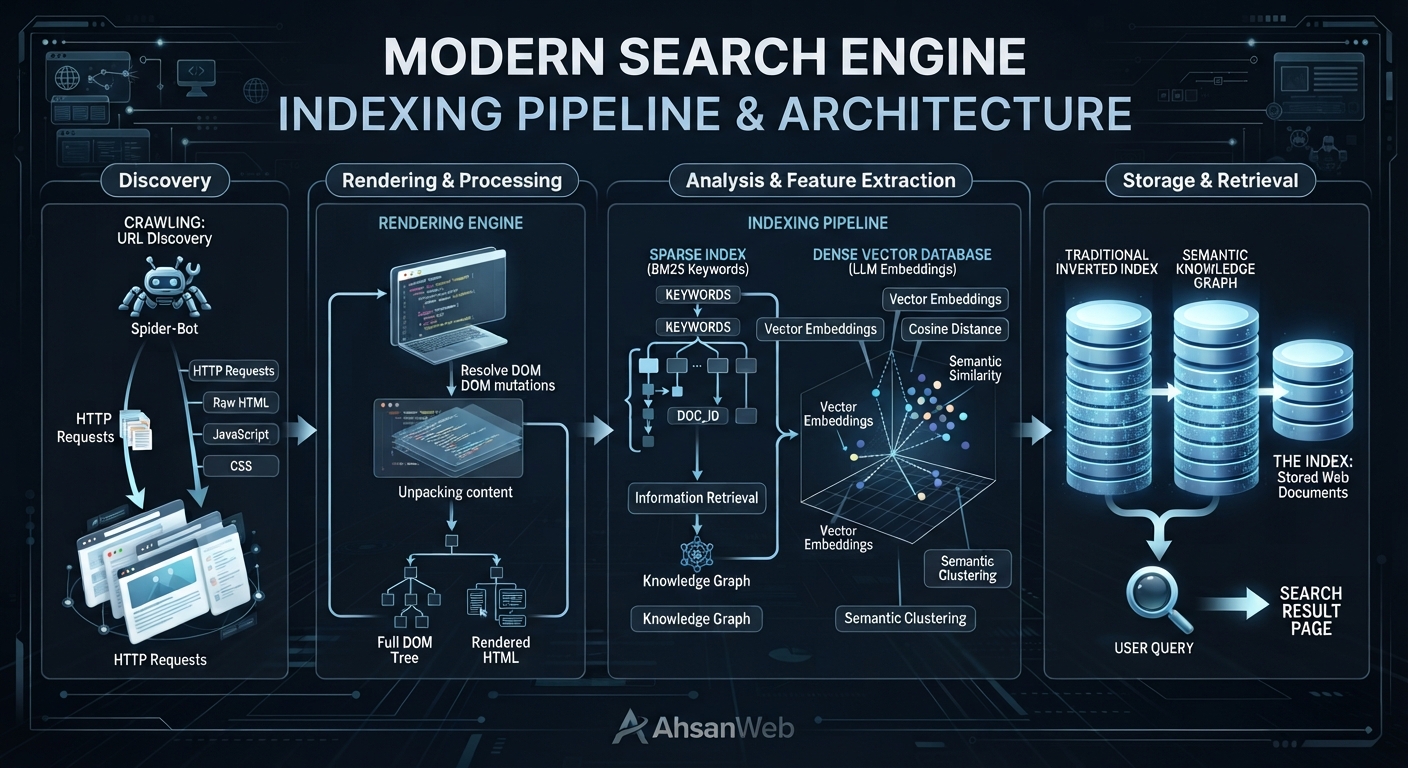
Search engines use automated systems to discover, load, and analyze web pages before saving them. If a page passes quality checks and technical rules, it gets stored in an index where it can be retrieved instantly.
How Search Engines and AI Read and Process Web Pages
When a search engine bot visits your site, it loads your code and runs any JavaScript to see the full page layout, just like a real user.
Once loaded, the engine breaks down the text, headings, and code. Traditional engines link specific words directly to your page. Modern AI search systems take this a step further by turning your content into numeric maps (called vector embeddings). These maps help AI understand concepts, tone, and context so it can answer complex user questions accurately.
During this process, the engine measures how closely your content matches the user’s search intent. If a page fails quality checks or has technical issues (like duplicate content), it will remain unindexed and won’t appear in search results.
Proximity Protocol: How Search Engines Measure Relevance
When an AI search engine processes your content, it uses proximity protocols to evaluate how closely words, concepts, and entities are linked together on a page.
Instead of just checking if two target keywords exist on your site, the engine analyzes:
Distance: How many words or paragraphs separate two related terms.
Context: Whether keywords share a logical sentence structure or topical relationship.
Semantic Proximity: How closely related concepts are mapped within vector space.
If relevant terms are placed too far apart or separated by thin, unrelated filler content, the search engine assigns a lower relevance score—which can prevent the page from ranking for multi-term or conversational search queries.
Old Keyword Indexing vs. Modern AI Vector Search
In the past, search engines relied heavily on exact keyword matches. If someone searched for a word, the search engine looked for pages containing that exact phrase.
Today, search engines combine word matching with AI vector search. This allows them to understand synonyms, related topics, and intent. Instead of just counting words, the engine evaluates how well your content covers a topic as a whole.
To make sure search engines can find and index your pages quickly, you need to set up clear rules for crawlers and maintain a clean website structure.
Key Code, Meta Tags, and Robots.txt Settings for Better Discovery
You can guide search engines using simple control files and HTML tags.
Robots.txt File: Tells search crawlers which parts of your site they can visit and which areas to stay away from (like checkout pages or internal account settings).
Meta Robots Tag: Placed in your page HTML to explicitly tell crawlers to index the page and display preview images or snippets in search results.
Fixing Slow Speed, Server Errors, and Page Duplicates
Search engines have a limited amount of time to crawl your website. If your site is slow or messy, crawlers may leave before indexing your content.
Fix Page Duplicates: Use self-referencing canonical tags to tell search engines which version of a web page is the main copy.
Speed Up Your Server: Keep your server response fast so crawlers don’t time out or drop connections.
Manage Filter Pages: Add noindex tags to unnecessary filtered or sorted pages so you don’t waste crawler resources on duplicate content.
How to Measure Your Success in Search and AI Answers
Tracking your website’s performance requires looking beyond simple keyword ranks.
Tracking Your Indexed Pages and AI Citations
As search evolves toward generative answers and zero-click AI overviews, traditional tracking metrics like average keyword position are no longer enough. Modern digital strategists must expand their metrics to measure deep visibility:
Index Coverage Ratio: The percentage of valid, high-value URLs successfully stored in search engine databases versus submitted URLs.
Content Quality & Depth: A composite evaluation of document semantic density, entity alignment, and topical depth against competitors.
AI Citation Frequency: Tracking how often an indexed document’s extracted entities, structured data points, and insights are cited inside generative AI answer blocks.
To achieve continuous visibility gains and resolve deep architectural roadblocks, leverage professional technical SEO audit services to uncover hidden crawler traps, JavaScript rendering failures, and canonical misalignments.
Frequently Asked Questions
What is the difference between crawled and indexed pages?
A crawled page is simply discovered and downloaded by a search engine bot. An indexed page has passed quality evaluations, been processed through rendering and vectorization pipelines, and stored in the database available for retrieval during user queries.
Why are some of my web pages not getting indexed?
Pages often fail indexing due to technical blocks such as accidental noindex tags, robots.txt disallows, thin content, duplicate URL parameters, slow server response times, or structural canonicalization errors.
How can I get search engines to index my pages faster?
You cannot strictly “force” indexing, but you can accelerate discovery by submitting an updated XML sitemap, utilizing the Indexing API for eligible content types, ensuring pristine internal linking, and eliminating rendering barriers.
Most companies evaluating GEO services already understand the basic idea. The harder question is more practical:
What actually happens after you hire a GEO provider?
A credible engagement should produce measurable technical changes, clearer content architecture, repeatable citation monitoring, and a reporting system that connects AI visibility to business outcomes.
This guide explains what a professional GEO engagement can include, how the work progresses, what technical deliverables to expect, and how to compare providers before making a decision.
At a Glance: Key Generative Engine Optimization Deliverables
These should be treated as engagement benchmarks, not guaranteed outcomes. Actual performance depends on the site’s technical condition, authority, content quality, query set, AI platform, and implementation speed.
1. How AI Search Engines Crawl, Retrieve, and Cite Content
A GEO engagement is most useful when every deliverable maps to a specific part of the information-retrieval process.
The objective is to make the right information accessible, understandable, retrievable, and attributable when an AI system processes a relevant query.
Crawl: Making Content Accessible for AI Bots
The first step is technical accessibility.
A GEO audit should examine:
For JavaScript-heavy websites, the important question is whether the content that matters is available in the HTML that crawlers can access.
A provider should be able to demonstrate the difference between what a browser renders and what a crawler can actually retrieve.
Chunk: Structuring Information into Semantic Passages
Large pages often contain multiple ideas competing for the same contextual signal.
GEO work can therefore restructure important sections into self-contained semantic passages. Your existing implementation framework uses roughly 200–400 words as a working range for these passages.
The purpose is not to force every section into an arbitrary word count.
The purpose is to make each passage answer a coherent question without depending heavily on unrelated surrounding text.
Embed: Strengthening Vector and Semantic Relevance
Modern retrieval systems can represent content and queries in vector spaces.
That makes semantic relationships important.
Instead of optimizing a page around one exact keyword, GEO work should strengthen the relationships between:
This creates broader contextual coverage rather than isolated keyword targeting.
Retrieve and Generate: Becoming a Candidate Source
Retrieval determines which information is available to the generation system.
That means a page can be technically crawlable yet still perform poorly if its content is difficult to retrieve or lacks sufficient contextual relevance.
A strong GEO engagement therefore measures retrieval performance rather than relying exclusively on traditional keyword rankings.
2. Core Metrics Optimization in Generative Engine Optimization
Traditional SEO metrics still have value, but they do not tell the entire story when the objective is AI visibility.
A mature GEO measurement framework should include several layers.
Information Retrieval Performance
Measure how frequently relevant passages appear among the top retrieved candidates for a defined query set.
Recall@10 can be used as one practical metric:
The exact evaluation methodology should be documented so that results are reproducible.
Citation Share & AI Visibility Tracking
Track how frequently the brand or its content is cited across a defined set of relevant AI queries.
Rather than reporting:
A better report shows:
The trend matters more than a single number.
Entity & Semantic Relationship Coverage
Entity Coverage
A strong GEO strategy also evaluates whether important entities are clearly represented and connected.
For example:
Brand → Product → Category → Use Case → Problem → Industry
The stronger these relationships are, the easier it becomes to build coherent topical coverage.
Semantic Coverage
Instead of measuring only one target phrase, map the broader question neighborhood around the commercial topic.
For example:
Generative engine optimization services
can connect to:
The objective is to create meaningful coverage around the subject, not simply repeat the primary keyword.
GEO does not end when the first technical fixes are deployed.
AI search systems change continuously, and competitor content changes as well.
Ongoing work can include:
4. Performance Benchmarks for Generative Engine Optimization
The following framework can be used as a practical way to communicate progress:
These are working ranges from the engagement framework, not guarantees or universal industry benchmarks. The underlying draft explicitly presents them as realistic ranges that vary according to technical complexity.
For that reason, a provider should always establish a baseline before promising a target.
5. Technical Deliverables and Configuration Code
A serious GEO engagement should produce artifacts that another technical team can inspect, reproduce, and implement.
Example: GEO Audit Configuration
The important point is not the YAML itself.
It is the operational principle behind it.
The engagement should define what is being tested, what constitutes a failure, what is being measured, and how the results will be compared over time. Your original draft similarly positions the runnable configuration and baseline report as a week-one deliverable rather than a static PDF.
Example: Recurring Citation Sweep
A useful report should show:
Baseline → Current State → Change → Cause → Recommended Action
That is substantially more useful than a monthly screenshot of AI search results.
6. Measuring ROI and Business Impact of Generative Engine Optimization
Executives ultimately need to connect technical improvements to commercial outcomes.
Not every organization will be able to attribute revenue directly to an AI citation.
That is why the measurement framework should distinguish between technical KPIs, visibility KPIs, behavioral KPIs, and revenue KPIs rather than forcing every engagement into an ARR number.
7. Comparing Top Generative Engine Optimization Service Providers
Provider comparisons are useful when they focus on what each company actually emphasizes, rather than presenting unsupported claims of superiority.
The draft’s provider comparison uses these same providers and positions them around their stated service focus rather than treating the list as an endorsement.
When comparing providers, ask five questions:
The differentiator is not the number of deliverables.
It is whether the provider can improve retrieval quality, demonstrate what changed, and measure whether visibility is increasing.
8. Questions to Ask Before Hiring a GEO Agency
Before signing a GEO engagement, ask for evidence rather than terminology.
Ask for a Baseline
A provider should be able to show where your domain currently appears across a defined query set.
Ask What Gets Implemented
There is a major difference between:
“Here are 50 recommendations.”
and:
“Here are the 12 changes we implemented, why they matter, and how we will measure them.”
Ask How Citations Are Measured
The provider should define:
Ask About Technical Access
Implementation-level GEO work may require repository, hosting, CMS, analytics, or other technical access depending on scope.
Without implementation access, the engagement may be an audit or consulting engagement rather than an implementation service.
Ask for Trend Data
Never evaluate GEO performance from one screenshot.
Ask for:
Baseline → Month 1 → Month 2 → Month 3
The direction of change is more informative than a single citation percentage.
9. The Bottom Line: What a Good Generative Engine Optimization Engagement Looks Like
A strong generative engine optimization service should not feel like traditional SEO with “AI” added to the sales deck.
The measurement system proves whether the foundation is producing better AI visibility.
And the business layer determines whether that visibility is actually valuable.
Ready to Evaluate Your AI Visibility?
Start with the Answer Engine Diagnostic ($1,500) to establish a technical baseline, identify crawl and retrieval issues, and benchmark your current AI citation visibility.
For organizations requiring implementation and ongoing optimization, the Enterprise GEO Blueprint extends the engagement into technical remediation, semantic architecture, structured data, retrieval measurement, and continuous citation optimization.
The goal is not simply to appear in AI answers.
The goal is to become a source that AI systems can reliably discover, retrieve, understand, and cite.
What Is AI Search Optimization? The Mechanics Behind AI Visibility
AI search optimization is the practice of structuring content and technical infrastructure so AI systems — ChatGPT, Perplexity, Google AI Overviews — can retrieve and cite it. AI search visibility is how that success gets measured: how often your content is actually surfaced and quoted, tracked engine by engine, not as a single rank position. Both start from the same underlying mechanism: AI search turns your question and the content on the web into “vector embeddings” — a kind of numerical fingerprint for meaning — and compares those fingerprints instead of matching exact keywords.
That’s a big shift from how search worked for the last twenty years. Old-school search engines matched the words you typed to the words on a page. AI search matches the meaning behind your question to the meaning of a passage, even if the wording is completely different. Understanding this shift — and the steps happening behind the scenes — is what separates content that gets picked up by an AI Overview from content that quietly gets ignored. Whether you call the underlying technology an AI search engine, an AI Overview, or a generative answer engine, the mechanism behind all of them is the same.
Reverse-Engineering Modern Search Engine & LLM Processing
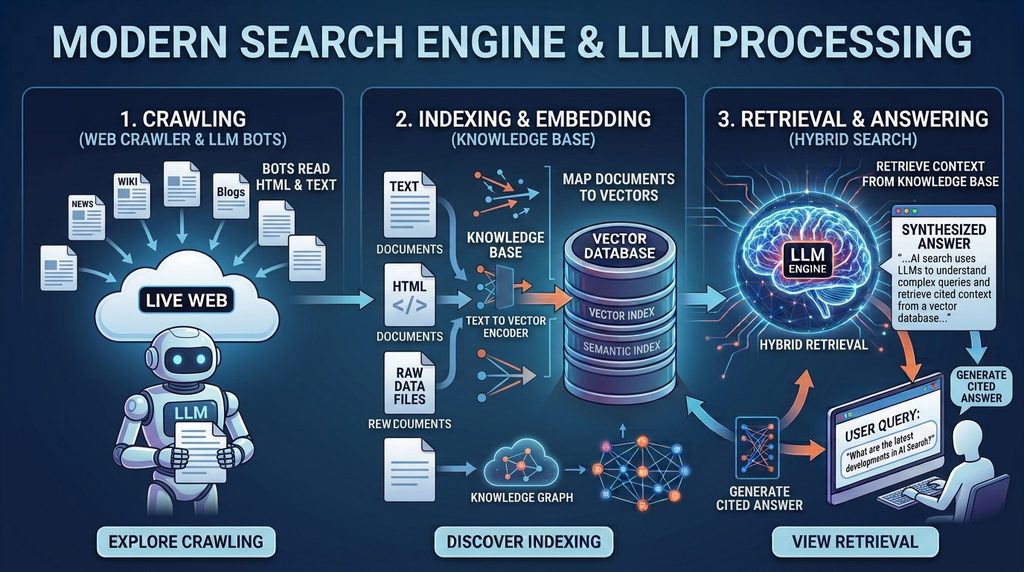
Every AI search tool — Google’s AI Overviews, Perplexity, or a ChatGPT search — follows roughly the same five steps behind the scenes:
Crawl — a bot visits your page and reads the rendered content, similar to classic search, but it pays extra attention to clean HTML structure and structured data.
Chunk — instead of treating your page as one big block, the system splits it into smaller sections (usually 200–500 words) called passages.
Embed — each passage gets converted into a vector: a list of numbers that represents its meaning.
Index — those vectors get stored in a database built for this kind of search, alongside metadata and links to related concepts (a “knowledge graph”).
Retrieve & Generate — when someone asks a question, their question gets turned into a vector too, the system finds the closest-matching passages, and an AI model turns them into one written answer.
Here’s the part that matters most for your content strategy, you’re no longer competing page-against-page. You’re competing passage-against-passage — your one section on shipping costs is competing directly against every other site’s section on shipping costs, not against their whole page.
And this isn’t just theory. Semrush’s tracking shows AI Overviews now show up on roughly 16% of Google searches as of November 2025, after peaking near 25% earlier that year. Even more telling: one study of ChatGPT citations found that pages sitting at position 21 or lower in classic search — well off page one — still got cited almost 90% of the time, as long as the passage itself gave a clear, quotable answer. Ranking on page one still helps, but it’s no longer required to get quoted by an AI.
It also matters which bot is doing the crawling. “AI crawler” isn’t just one bot — it’s several, each built by a different company for a slightly different job:
Crawler
Operator
Purpose
Primary Data Source
Renders JavaScript?
GPTBot
OpenAI
Training-data collection
Live crawl for training
No — server-side HTML only
OAI-SearchBot
OpenAI
Search index / citations for ChatGPT search
Live crawl + Bing’s search index
No
ChatGPT-User
OpenAI
On-demand fetch during a live user session
Training data + live web via OAI-SearchBot
No
ClaudeBot
Anthropic
Training-data collection
Live crawl for training
No
Claude (web search enabled)
Anthropic
Real-time answer grounding
Training data + Brave Search index (Anthropic’s search partner)
No
PerplexityBot
Perplexity
Real-time retrieval at query time
Perplexity’s own real-time index
No
Googlebot (AI Overviews)
Google
Classic crawl, reused for AI Overviews
Google’s own search index
Yes — full rendering
Gemini
Google
Conversational search grounding
Training data + Google’s search index
Varies by surface
Here’s why that’s not just trivia: if you want to show up in ChatGPT, your content also needs to do well in Bing’s index — that’s the live-web source OAI-SearchBot pulls from, not Google’s. Claude works the same way but through Brave Search instead. So a site can be perfectly optimized for Google and still be invisible to someone asking Claude a question with web search turned on.
Here’s the practical takeaway: unlike Googlebot, none of these AI crawlers can run JavaScript. If your main content — the actual text an AI would want to quote — only appears after the page loads via React, Vue, or a similar framework, these bots simply never see it. It doesn’t matter how nice the page looks to a person, or even to Googlebot. Making sure your content is there in the raw HTML (through server-side rendering or a static site) isn’t a nice-to-have for AI search visibility — for these bots, it’s the only thing that works.
This is a distinct problem from Next.js hydration issues, and it’s worth not conflating the two. A hydration mismatch happens when the HTML a Next.js server sends doesn’t match what React expects to render client-side — the content is technically present in the raw HTML that AI crawlers read, but the mismatch can trigger console errors, layout shifts, and in some cases a full client-side re-render that silently swaps the content after load. Since Google’s own crawler does render JavaScript and factors Core Web Vitals like CLS into how it evaluates a page, a hydration mismatch can still hurt AI Overview eligibility even though the AI-only crawlers technically saw the correct initial HTML. Fixing hydration errors and fixing JavaScript-only content injection are two separate audits, and a site can pass one while failing the other.
Information Retrieval Models vs Traditional Indexing
Classic search used something called an inverted index — basically a giant lookup table matching keywords to the pages that contain them. Older ranking systems like TF-IDF or BM25 scored pages mostly by how often and where a keyword appeared, plus how many other sites linked to it.
AI search works differently — it uses dense retrieval. Your question and every passage on the web get placed in the same “meaning space,” and closeness in that space (measured as cosine distance) decides what’s relevant. Two passages can use almost none of the same words and still be treated as a great match, as long as they mean roughly the same thing. That’s how an AI can answer your question using a paragraph that never uses your exact wording.
Most real-world systems don’t pick just one approach — they blend both. This is called hybrid retrieval: combine a classic keyword score (BM25) with a meaning-based vector score, then re-rank the combined results before generating an answer. Knowledge graphs add a third layer on top, linking related concepts together so the system can tell the difference between, say, “Python” the programming language and “python” the snake, based on the surrounding context rather than word similarity alone.
Strategic Implementation & Best Practices for Engineers
Optimizing for AI search means making sure your content and your site’s technical setup survive every step of that five-step process above — not just step one.
Start by giving crawlers clear signals about who wrote the content and what it’s about, instead of leaving the AI to guess from the prose alone:
json
{
  "@context": "https://schema.org",
  "@type": "TechArticle",
  "headline": "What is AI Search? How Modern LLMs Crawl & Index the Web",
  "about": [
    { "@type": "Thing", "name": "Vector Embeddings" },
    { "@type": "Thing", "name": "Knowledge Graphs" },
    { "@type": "Thing", "name": "Information Retrieval" }
  ],
  "proficiencyLevel": "Expert",
  "dependencies": "Vector database, embedding model API",
  "author": {
    "@type": "Person",
    "name": "Tanvir Ahsan",
    "jobTitle": "Enterprise SEO & AI Search Strategist",
    "knowsAbout": ["Generative Engine Optimization", "Vector Search", "Semantic SEO"]
  }
}
Here’s a simple example of what happens behind the scenes. Say you run an online cookware store and want your product pages to show up when someone asks ChatGPT “what’s a good cast iron skillet for beginners.” This Python code takes a product description, turns it into a vector, and stores or searches it — which is basically what an AI search engine is doing to your published pages:
python
import os
from openai import OpenAI
from pinecone import Pinecone

client = OpenAI(api_key=os.environ["OPENAI_API_KEY"])
pc = Pinecone(api_key=os.environ["PINECONE_API_KEY"])
index = pc.Index("cookware-product-catalog")

def embed_chunk(text: str) -> list[float]:
    response = client.embeddings.create(
        model="text-embedding-3-large",
        input=text
    )
    return response.data[0].embedding

def index_product(sku: str, description: str, url: str, entity_tags: list[str]):
    vector = embed_chunk(description)
    index.upsert(vectors=[{
        "id": sku,
        "values": vector,
        "metadata": {"url": url, "text": description, "entities": entity_tags}
    }])

# Example: indexing a product page for AI shopping assistants
index_product(
    sku="CI-SKILLET-10IN",
    description="10-inch pre-seasoned cast iron skillet, ideal for beginners. "
                 "Works on induction, gas, electric, and open flame. "
                 "Naturally non-stick surface that improves with use.",
    url="https://example-cookware.com/products/10in-cast-iron-skillet",
    entity_tags=["cast iron skillet", "beginner cookware", "induction-safe"]
)

def retrieve_top_k(query: str, k: int = 5):
    query_vector = embed_chunk(query)
    results = index.query(vector=query_vector, top_k=k, include_metadata=True)
    return [(match["score"], match["metadata"]["url"]) for match in results["matches"]]

# Example: this is roughly what happens when someone asks an AI
# shopping assistant "best cast iron skillet for a beginner"
retrieve_top_k("best cast iron skillet for a beginner")
Writing in clean, self-contained sections (one idea per 200–400 words, under a clear heading) makes it much easier for this chunking step to pull out your content cleanly. A section that jumps between several unrelated ideas turns into a messy, unclear vector — and messy vectors rarely make it into the AI’s shortlist of best matches.
Edge Cases, Performance Tuning & Scalability
Not every retrieval method performs the same, and the differences get bigger as more people use the system at once. Here’s how the three main approaches compare on a standard test:
Retrieval Method
Recall@10
Mean Reciprocal Rank
Avg. Query Latency
Sparse (BM25 only)
0.61
0.42
8ms
Dense (vector only)
0.78
0.58
35ms
Hybrid (BM25 + vector + re-rank)
0.89
0.71
60ms
Hybrid retrieval gives the best results, but it’s almost twice as slow as vector-only search. That’s exactly why most AI search products only re-rank the top 20–50 candidates instead of the whole index — it’s a balance between accuracy and speed. If you’re building or evaluating one of these systems yourself, that cutoff number is the one setting most worth tuning: too small and you miss good matches, too large and answers start to feel slow.
The end-to-end pipeline, from crawl to generated answer, looks like this:
Looking at the crawler table above, most teams will want control over exactly which AI bots can access which parts of the site — for example, letting the citation-focused bots in while keeping training-only bots away from private or paywalled pages:
At scale, the real bottleneck usually isn’t the embedding model itself — it’s how quickly the index gets updated. If your site publishes a new page but the vector index doesn’t pick it up for hours or days, that page is invisible to AI search during that whole window, no matter how good it is. This is the same underlying problem as render-delay indexing issues, and it’s worth checking how long it actually takes a new page to show up, rather than assuming it’s as fast as classic search.
Worth separating from the indexed-retrieval pipeline above: MCP (Model Context Protocol) is a different pattern entirely. Rather than pre-embedding your content into a static vector index ahead of time, MCP lets an AI agent connect directly to a live tool or data source — a database, an API, a search service — and pull current information at the moment a question is asked. An AI assistant answering through an MCP-connected search tool isn’t matching against a pre-built index at all; it’s querying your system live, the same way a person would call an API. That has a real implication for anything transactional (pricing, inventory, availability): a stale vector index is a known problem with a known fix, but a live MCP connection depends entirely on the underlying service being fast, available, and returning clean, well-structured data on request.
Query Fan-Out: Why One Question Becomes Many Retrievals
A single question rarely turns into just one search behind the scenes. Most AI search systems do something called query fan-out: they break your question into several smaller, related questions, look up passages for each one separately, then combine everything into one answer. Ask “what is AI search and how does it work,” and the system might quietly also search for “vector embeddings,” “retrieval-augmented generation,” and “AI search vs SEO” — then blend all of that into the final response.
What this means in practice: a page that only targets its main keyword is only fighting for a small slice of the opportunity. Content that also answers the obvious follow-up questions around a topic — what it is, how it compares to alternatives, how it actually works — has more chances of getting pulled into the final answer, even when it never directly targets the exact phrase someone typed.
Future Evolution & Measuring Long-Term Organic ROI
AI search doesn’t stay still. The models, the ranking methods, and how citations get decided keep changing at every major provider. That means the old habit of just checking your keyword rankings won’t tell you much anymore — you need to know whether you’re actually being cited.
This is what a specialized generative engine optimization agency focuses on: regularly checking which of your passages are getting picked up, by which AI engines, for which questions — and fixing the ones that aren’t.
Key Performance Indicators & AI Citation Tracking
Regular rank tracking doesn’t work well here, because there’s no fixed position on the page to track anymore. This is really what AI search optimization is about — measuring and improving different signals instead of a rank number.
Citation Share — how often your site actually gets cited in an AI-generated answer (across Google AI Overviews, Perplexity, ChatGPT, and so on), out of all the questions you’re tracking.
Passage Retrieval Rate — how often your specific sections get pulled into the shortlist of candidates, whether or not they end up quoted in the final answer.
Semantic Clustering Coverage — how wide a range of related questions your content shows up for, which tells you how well it covers a full topic instead of just one narrow phrase.
Zero-Click Attribution — the lift in direct traffic or brand searches that comes from being cited, since an AI citation rarely leads to an actual click.
Tracking this well usually needs a dedicated AI search visibility tool — a normal rank tracker has no way to notice that your content got quoted inside a generated answer. Think of it like the difference between “did my ad get clicked” and “did someone mention my product in a conversation they had with a friend” — the second one needs a completely different kind of listening. Purpose-built AI search monitoring tools track citation frequency, passage-level retrieval, and visibility engine-by-engine (Google AI Overviews vs. Perplexity vs. ChatGPT), because a site can be cited constantly in one engine and never show up at all in another, even using the exact same content.
None of this works in isolation from what happens off your own site, either. AI systems look at what other trustworthy sites say about you, not just what you say about yourself — think of it like a job reference. You can write the most impressive résumé in the world, but if nobody else vouches for you, it carries less weight. Mentions and links from relevant publications, a consistent, accurate profile across places like Wikipedia, and genuinely helpful (not promotional) participation in the communities where people discuss your topic — all of that builds the kind of trust an AI system needs before it treats you as a source worth citing. Structuring your content well determines whether it can be found. This off-page trust is a big part of whether it gets believed once it is.
Keeping an eye on these numbers over a 90-day stretch is what separates a page that got lucky once from a site building real, lasting authority.
Ready to Audit Your AI Search Visibility?
If you don’t actually know how often your content gets picked up and cited by AI search engines, you’re flying blind. Start with the Answer Engine Diagnostic ($1,500) for a full check of your citations and passage-level visibility, or scope out a full Enterprise GEO Blueprint for ongoing, long-term authority building.
Frequently Asked Questions
What is the difference between AI search and traditional SEO? Traditional SEO ranks whole pages using keywords and backlinks. AI search picks out individual passages using vector embeddings and meaning-based matching, then blends them into one answer — so the real competition happens at the passage level, not the whole-page level.
How do LLMs decide which sources to cite in an AI Overview? LLMs cite the passages that come back as the closest matches in the vector index, usually after a re-ranking step that blends keyword relevance, meaning-based similarity, and how confident the system is in the source’s authority.
Can a page rank well in Google but be invisible to AI search? Yes, and it happens more than you’d think. Imagine a well-written page that isn’t broken into clear, self-contained sections, or a fast-moving site whose vector index hasn’t caught up with a recent update — either one can rank normally in classic Google search while never once showing up in an AI-generated answer.
What is Generative Engine Optimization (GEO)? GEO means shaping your content, your metadata, and your technical setup so AI systems can actually find and cite it — as opposed to optimizing purely for old-school ranking algorithms.
What is AI search optimization? AI search optimization is the day-to-day work of making sure AI systems can find, understand, and quote your content in their answers. That includes writing in clear passages, adding structured data, making sure AI crawlers can actually see your pages, and regularly checking whether you’re being cited.
How do you track AI search engine citations? You track citations by regularly asking the AI engines you care about — Google AI Overviews, Perplexity, ChatGPT — a set list of questions, and logging whether your site shows up in the answer each time. A normal rank tracker can’t do this, since it has no way to see inside a generated answer.
How do you improve brand visibility in AI search? Break your content into clean, self-contained sections; make sure AI crawlers can actually read your pages (server-side rendering, not just JavaScript); add structured data with clear author and topic signals; and check your citation rate on each AI engine separately, since they don’t all behave the same.
What is query fan-out in AI search? Query fan-out is when an AI system quietly breaks your one question into several smaller related questions, searches for each separately, then combines everything into one answer. For example, asking “how do I train for a 5K” might silently fan out into searches for beginner running plans, injury prevention, and pacing strategy — and content that covers those angles has a better shot at being pulled in, even if it never uses the exact words “train for a 5K.”
Does a Next.js hydration error affect AI search visibility? It can, but differently than a fully JavaScript-rendered page. The content is technically present in the raw HTML AI crawlers read, but a hydration mismatch can cause layout shifts and console errors that hurt Core Web Vitals, which Google’s crawler does factor in when it renders a page for AI Overviews — so hydration bugs and JavaScript-only content injection need separate fixes.
Is ChatGPT a web crawler? No, ChatGPT itself isn’t a crawler. OpenAI operates separate bots for that: GPTBot collects training data, OAI-SearchBot builds the live search index ChatGPT draws from, and ChatGPT-User fetches a specific page in real time only when a live user session needs it. ChatGPT the chat product never crawls the web directly — it relies on those three bots and, for some queries, Bing’s index.
What is MCP (Model Context Protocol) and how does it relate to AI search? MCP lets an AI agent connect directly to a live tool or data source, like a database or API, and pull current information at the moment a question is asked, instead of matching against a pre-built vector index. It matters most for transactional information like pricing or availability, where a static index would otherwise go stale.
Something has shifted in how high-performance web teams make platform decisions. Five years ago, the conversation was straightforward: content site means WordPress, web application means React. Today, a growing category of websites — SaaS marketing sites, developer documentation platforms, enterprise product pages, content-heavy publications — is choosing Next.js for both.
The reason is not that WordPress has gotten worse. It is that Next.js has matured into a platform that delivers on things WordPress cannot: structural performance advantages, granular control over every byte of HTML output, rendering flexibility that adapts per page rather than per site, and AI visibility that comes from the framework’s architecture rather than requiring plugin configuration.
This article is specifically for development teams and technical founders evaluating Next.js as a platform for SEO and AI search visibility. It explains what Next.js does differently at an architectural level, how those differences translate into ranking and citation advantages, and where the tradeoffs are — because there are real ones.
What Makes Next.js Different From a Traditional CMS
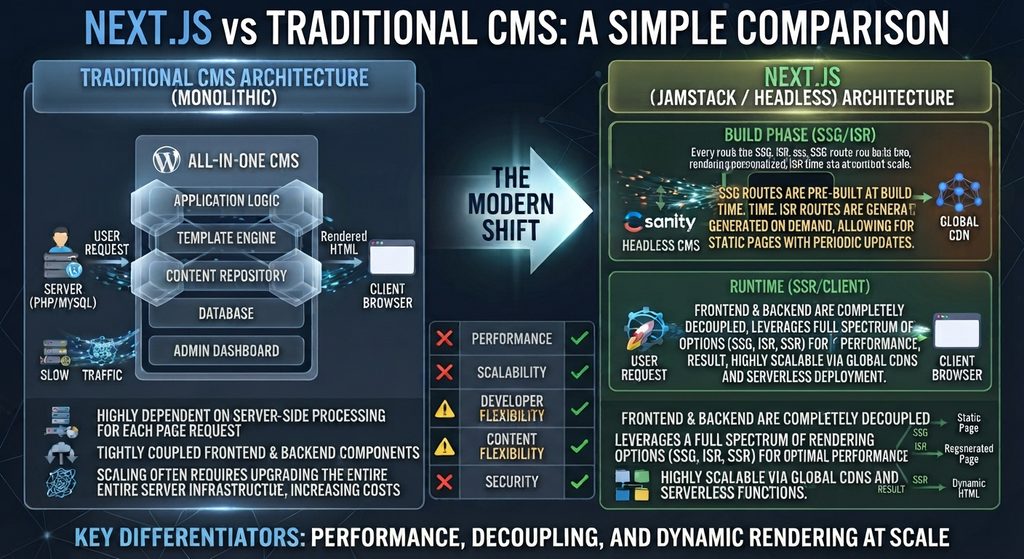
Most content management systems — WordPress, Drupal, Joomla — share a fundamental architecture: the CMS manages both the content and the rendering. You write a post in the CMS editor, the CMS stores it in a database, and when a visitor requests the page, the CMS retrieves the content and generates the HTML using its template system.
Next.js works differently in a way that matters for SEO. It is a React framework — not a CMS — that gives developers complete control over how content is fetched, how pages are rendered, and what HTML is delivered to the browser and to crawlers.
Not Client-Side React — A Critical Distinction
The most important thing to understand about Next.js for SEO is what it is not. It is not the same as building a React application with Create React App or Vite, where content is rendered client-side in the browser and AI crawlers receive an empty <div id="root">.
Next.js solves the client-side rendering problem at the framework level. By default — without any special configuration — Next.js pages render on the server and deliver complete HTML in the HTTP response. Developers who build with Next.js get React’s component model and developer experience without the crawlability penalty of client-side rendering.
The App Router and React Server Components
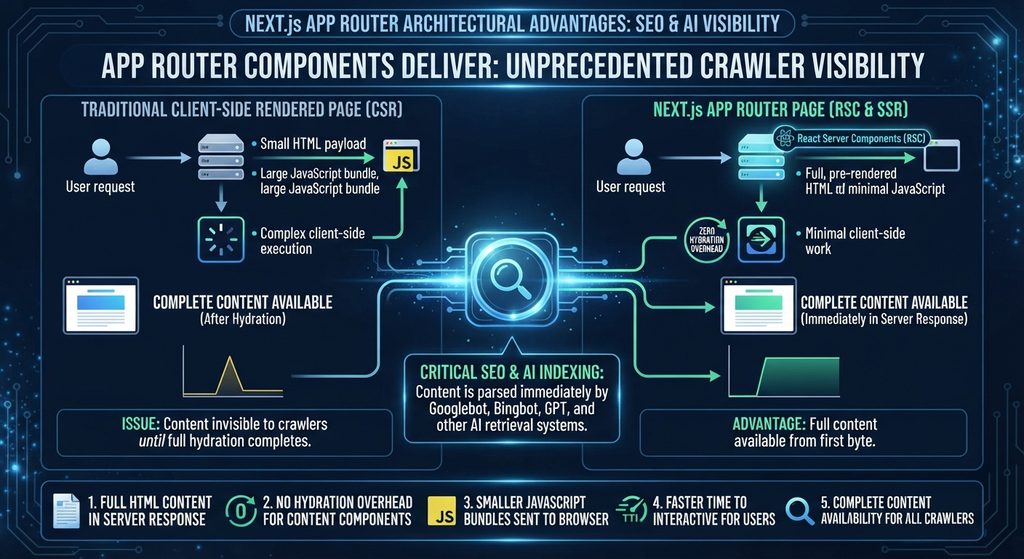
Next.js 13 introduced the App Router, which makes server rendering even more pervasive. With the App Router, React components are server components by default — they run on the server, fetch their data, render their HTML, and send the result to the browser without shipping any JavaScript to the client for those components.
This is architecturally significant for SEO and AI visibility. A page built with App Router components delivers:
Full HTML content in the server response
No hydration overhead for content components
Smaller JavaScript bundles sent to the browser
Faster Time to Interactive for users
Complete content availability for all crawlers
Only interactive components — forms, dropdowns, state-dependent UI — are marked with "use client" and hydrated in the browser. Static and content-focused components stay entirely on the server.
File-Based Routing
Next.js uses the file system as its routing layer. A file at app/blog/[slug]/page.tsx automatically creates a route at /blog/[post-slug]. This produces clean, predictable URL structures without plugin configuration or manual permalink settings.
For SEO, clean URL structure matters for both canonicalization and internal linking legibility. For development teams, file-based routing means URL architecture decisions are made in the file system — visible, auditable, and version-controlled — rather than buried in CMS settings.
Built-In SEO Primitives
Next.js provides first-class support for the HTML elements that SEO depends on:
The Metadata API (App Router) generates <title>, <meta>, Open Graph, and Twitter card tags from a single exported object per page. Metadata is rendered server-side and appears in the raw HTML response — fully accessible to every crawler.
typescript
export const metadata = {
  title: 'Next.js for SEO: Complete Guide',
  description: 'How Next.js SSR and SSG deliver AI-crawlable HTML.',
  openGraph: {
    title: 'Next.js for SEO',
    type: 'article',
    publishedTime: '2026-01-15',
  },
}
The Image component (next/image) automatically optimizes images: serving WebP to browsers that support it, adding explicit width and height attributes to prevent layout shift, and lazy loading below-fold images without developer configuration.
Link prefetching for navigation links, automatic code splitting per route, and built-in support for robots.txt and sitemap.xml generation complete the framework’s SEO toolkit.
SSR, SSG, and ISR: Next.js Rendering Options for SEO
One of Next.js’s most valuable SEO characteristics is rendering flexibility. Different pages on the same site can use different rendering strategies, chosen based on each page’s specific content and update requirements.
Server-Side Rendering (SSR)
SSR in Next.js generates the complete HTML for a page on each request. The server fetches current data, renders the component tree, and returns a fully populated HTML document.
In the App Router, SSR is the default for any component that fetches data dynamically:
Best for: Pages with content that changes frequently — pricing pages, inventory, news, real-time data. Content is always current when the crawler arrives.
Static Site Generation (SSG)
SSG pre-builds pages at deploy time. The framework generates complete HTML for every page during the build process, and those files are served directly from a CDN edge with no server computation at request time.
Best for: Blog posts, documentation, marketing pages, content that changes infrequently. Delivers the fastest possible TTFB — often under 50ms from CDN edge — which is ideal for both user experience and crawler efficiency.
Incremental Static Regeneration (ISR)
ISR combines static speed with content freshness. Pages are pre-built statically, but Next.js regenerates them in the background at defined intervals or when content changes are triggered via a revalidation webhook.
Best for: Content that changes periodically — product catalogues, frequently updated guides, high-traffic landing pages that need occasional updates without full rebuilds.
The SEO Rendering Decision Matrix
Content Type
Update Frequency
Best Rendering
Why
Blog posts
Rarely
SSG
Maximum speed, full crawlability
Documentation
Monthly
SSG + ISR
Speed with periodic refresh
Product pages
Daily
ISR
Fresh without per-request cost
Pricing pages
Weekly
SSR or ISR
Accuracy critical
News/real-time
Continuous
SSR
Always current
Marketing pages
Rarely
SSG
Top performance, no overhead
All three methods deliver complete HTML to crawlers. The choice between them is about performance optimization and content freshness — not about crawlability, which all three satisfy equally.
Performance Advantages That Directly Affect SEO
Automatic Code Splitting
Next.js splits JavaScript bundles by route automatically. When a user visits /blog/post-title, they download only the JavaScript needed for that specific page — not the JavaScript for every other page on the site.
For SEO, this matters through Core Web Vitals. A smaller JavaScript bundle means faster Time to Interactive, which affects Interaction to Next Paint (INP) — a Core Web Vitals metric. WordPress with multiple plugins loads a global JavaScript bundle on every page; Next.js loads only what each page needs.
Edge Runtime and Global CDN Delivery
Next.js supports an Edge Runtime that allows server-side rendering to run at CDN edge nodes — the physical server locations closest to the user. Instead of a request traveling from a visitor in Singapore to an origin server in Virginia, the page is rendered and served from a Singapore edge node.
For AI retrieval crawlers that operate globally and are speed-sensitive, edge rendering means consistently fast response times regardless of the crawler’s geographic origin. PerplexityBot serving a user in Europe receives the same sub-100ms TTFB as a user in the United States.
Deployed on Vercel — Next.js’s native platform — this edge rendering happens automatically with zero infrastructure configuration. Alternative platforms like Netlify offer similar edge deployment for Next.js.
Core Web Vitals by Default
Next.js’s built-in optimizations align directly with Core Web Vitals requirements:
Core Web Vitals Metric
Next.js Feature
Impact
LCP (Largest Contentful Paint)
next/image, SSG + CDN
Faster image load
INP (Interaction to Next Paint)
Code splitting, partial hydration
Less JS blocking
CLS (Cumulative Layout Shift)
next/image enforces size attrs
No layout jump
TTFB (Time to First Byte)
Edge rendering, CDN
Fast first response
A well-built Next.js site consistently achieves Lighthouse performance scores in the 90–100 range for content pages. Achieving the same scores with WordPress requires deliberate caching configuration, CDN setup, image optimization plugins, and ongoing maintenance. Next.js achieves it through framework architecture.
AI Visibility Benefits of Next.js
Complete HTML in Every Server Response
The fundamental AI visibility requirement is that content exists in the HTML response when the crawler arrives. Every Next.js rendering method — SSR, SSG, ISR — satisfies this requirement completely.
GPTBot, PerplexityBot, ClaudeBot, and OAI-SearchBot all receive complete, content-rich HTML on their first fetch. No JavaScript execution required. No Wave 2 rendering queue. No crawler timeout from slow responses.
For development teams switching from a client-side React application to Next.js, this is often the most immediately impactful change: content that was previously invisible to every AI crawler becomes fully accessible overnight.
Surgical Metadata Control
WordPress with Yoast or Rank Math provides per-page control over titles, descriptions, and Open Graph tags. Next.js provides the same control, but implemented in code rather than through a CMS interface — which means it can be programmatic, conditional, and fully tested.
A Next.js blog can generate metadata from post content automatically:
Every field is derived from the content itself, is guaranteed to be accurate, and is rendered server-side — reaching every crawler without JavaScript dependency.
Server-Side JSON-LD Schema
Schema markup in Next.js is implemented directly in page components, rendered server-side, and delivered in the HTML <head>. There is no plugin dependency, no JavaScript injection risk, and no possibility of schema failing to reach AI crawlers.
Because this is a server component, the <script> tag with the JSON-LD is present in the raw HTML response. GPTBot reads it on the first fetch. The schema is guaranteed to be accurate because it comes from the same data source as the page content.
Per-Crawler Rendering Control
This is a Next.js capability with no equivalent in WordPress — and it is particularly relevant for GEO.
AI crawlers and Googlebot have different rendering requirements. Googlebot can execute JavaScript and benefits from full SSR with rich interactive context. GPTBot and PerplexityBot are HTML-only parsers that benefit most from the lightest, fastest possible server response. Human visitors benefit from optimal interactivity and perceived performance.
In Next.js, you can differentiate rendering behavior based on the request’s user-agent, serving each crawler the response format it handles best:
typescript
// middleware.ts
import { NextResponse } from 'next/server'

export function middleware(request) {
  const ua = request.headers.get('user-agent') || ''
  const isAICrawler = /GPTBot|PerplexityBot|ClaudeBot/i.test(ua)

  if (isAICrawler) {
    // Rewrite to a pre-rendered static version
    return NextResponse.rewrite(
      new URL('/static' + request.nextUrl.pathname, request.url)
    )
  }
  return NextResponse.next()
}
WordPress has no mechanism for this. Its PHP rendering pipeline produces the same response for every request regardless of who is asking. Next.js middleware intercepts the request before rendering and can serve a stripped, pre-rendered HTML response to AI crawlers — maximizing content density and minimizing response time for the bots that matter most for citation.
This does not mean serving different content to crawlers and users — that is cloaking, which violates Google’s guidelines. It means serving the same content in a format optimized for the receiver: full interactive HTML for humans, lean pre-rendered HTML for AI parsers.
Dynamic Schema From Page Context
The existing JSON-LD section above shows Article schema generated from post data. Next.js takes this further: schema can be generated dynamically based on page type, URL parameters, and content structure — something WordPress plugins with fixed schema templates cannot match.
Every page gets exactly the schema type that matches its content — automatically, accurately, server-side. No manual schema configuration per post. No plugin template limitations.
Precise HTML Control for Citation Optimization
In WordPress, the HTML structure of your pages is determined by your theme, your page builder, and your plugins — a stack of third-party code you configure but don’t write. If the theme adds unnecessary wrapper divs around headings, you can work around it but you can’t fully control it.
In Next.js, developers write the HTML directly in React components. The heading hierarchy, the semantic landmark elements, the paragraph structure, the list markup — all of it is explicit and intentional. A Next.js team that has read Articles 3 and 7 of this series knows exactly what crawlers see, because they wrote the HTML that crawlers receive.
This level of control compounds over time. Every structural decision made for readability — clean heading hierarchies, semantic landmark elements, self-contained sections — is also a citation-optimization decision that improves AI discoverability.
Real-World Use Cases: Who Should Choose Next.js
SaaS Marketing Sites
The companies building the tools that developers use — Vercel, Linear, Loom, Clerk, Resend, Supabase — run their marketing sites on Next.js. The pattern is consistent: React expertise on the engineering team, need for high Lighthouse scores, and a marketing site that must perform as well as the product it sells.
For a SaaS company, the marketing site is a direct revenue driver. A 200ms improvement in page load speed measurable translates to conversion rate improvement. Next.js’s performance defaults justify the development investment for this use case.
Developer Documentation
Large documentation sites — particularly those for developer tools and APIs — benefit from Next.js’s SSG capabilities. Thousands of documentation pages can be pre-built and served from CDN edge with sub-100ms TTFB. Content search and navigation remain fully client-side interactive while page content is fully static and crawler-accessible.
Enterprise Product Pages
Enterprise companies with dedicated frontend teams use Next.js to maintain performance SLAs that WordPress with its plugin ecosystem cannot reliably guarantee. When a VP of Engineering sets a “no page slower than 200ms TTFB” standard, Next.js with edge rendering is the only web framework that can reliably meet it in production.
Content Platforms With Developer Publishing Teams
Technical publications, developer blogs, and content platforms where the publishing team consists of developers — and where content is managed through Git and MDX rather than a CMS editor — are natural Next.js fits. The authoring workflow is code-native, the build pipeline is automated, and the performance output is optimized by default.
The Honest Tradeoffs
Next.js is not the right platform for every team or every site. The advantages above are real — and so are these:
There is no built-in content management interface. Non-developer content teams cannot use Next.js without a separate headless CMS (Contentful, Sanity, Prismic, Payload). This adds system complexity, subscription cost, and integration maintenance.
The initial development investment is significant. A well-built Next.js site requires experienced React developers, a thoughtful rendering strategy per route, schema implementation in code, and CI/CD pipeline configuration. WordPress can be launched in a day; a production-quality Next.js site takes weeks.
The talent pool is smaller. WordPress developers are the most abundant web development resource globally. Senior Next.js developers with deep SEO knowledge are significantly harder to find and more expensive to hire.
Ongoing maintenance differs in character, not in volume. WordPress requires plugin updates, hosting management, and security monitoring. Next.js requires dependency management, build pipeline maintenance, and headless CMS integration upkeep. Neither platform maintains itself.
The platform decision comes down to a single question: does your team have — or can it hire — the React development expertise to build and maintain a Next.js site?
When Next.js Wins
Next.js delivers a structural advantage over WordPress in these specific scenarios:
Scenario
Why Next.js Wins
High-traffic sites needing edge caching
Vercel/Cloudflare edge renders near the user; WordPress needs CDN config
Complex rendering requirements
Per-page SSR/SSG/ISR; WordPress has no equivalent
Personalized or dynamic content
SSR per-request with user context; WordPress caching breaks personalization
GEO-focused per-crawler optimization
Middleware can serve crawler-optimized responses; WordPress cannot
Teams with JavaScript/React expertise
Developers work in their native stack without plugin dependencies
Performance SLAs under 200ms TTFB
Edge runtime guarantees it architecturally; WordPress requires manual work
The Right Approach for Most Teams
For teams that need both content management velocity and delivery performance, the recommended path is:
Start with WordPress for content volume and SEO plugin maturity. WordPress’s block editor, Rank Math schema, automatic sitemaps, and PHP rendering deliver everything needed for strong SEO and AI crawlability without development overhead.
Layer Next.js as a headless front end when rendering control becomes a competitive requirement. This gives you WordPress’s content management speed — non-developers publishing independently, editorial workflows, media library — with Next.js delivery performance and per-crawler rendering optimization.
This is the headless WordPress + Next.js architecture covered in Article 15. It is not the right starting point for most teams, but it is the right destination for teams that outgrow what a traditional WordPress front end can deliver.
That comparison is examined in detail in the next article.
Building a Next.js site and want to verify its AI crawlability and schema implementation before launch? The Answer Engine Visibility Diagnostic tests every public-facing route against all major AI crawlers, validates your JSON-LD schema, and checks Metadata API output against best practice — delivered automatically as a structured PDF report.
This statement is true. It is also one of the most damaging half-truths in modern web development.
Because of it, teams have shipped client-side rendered React apps and watched their organic traffic stall. Content managers have published hundreds of posts that took weeks to index. Developers have argued against SSR migrations because “Google handles JavaScript fine now.” And throughout all of this, AI search products — which do not handle JavaScript at all — have been invisibly excluded from the conversation.
This article does not argue that JavaScript is bad or that React is incompatible with SEO. It argues for precision: understanding exactly what generative engines and AI systems can render, cannot render, and render imperfectly — so you can make decisions based on reality rather than reassuring generalities.
The Five JavaScript SEO Myths
Myth 1: “Google renders JavaScript just like a browser, so CSR is fine.”
Reality: False. Google uses a headless Chromium instance to render JavaScript, but this rendering happens in a queue — not in real time. There is a delay between when Googlebot fetches your page and when it renders the JavaScript. That delay can range from hours to weeks depending on your site’s crawl priority.
A full browser renders JavaScript in milliseconds. Google’s rendering queue can take days. These are not the same thing.
More critically: Google’s rendering is imperfect. Complex JavaScript interactions, API-dependent content, and certain React patterns can fail to render correctly in Google’s headless environment even when they work perfectly in a real browser.
Myth 2: “If Google can render it, all generative engines can.”
Reality: False. Google is uniquely sophisticated among crawlers. GPTBot, PerplexityBot, ClaudeBot, and OAI-SearchBot do not execute JavaScript at all. Bingbot has limited rendering capability. No AI search product matches Google’s rendering capability.
A site that “works fine for Google” because Google eventually renders its JavaScript may be completely invisible to every AI search product — which now represents a growing and significant share of information discovery.
Myth 3: “Adding prerendering solves the JavaScript problem.”
Reality: Partially true, often misconfigured. Prerendering — using a service like Prerender.io to serve pre-built HTML snapshots to crawlers — is a legitimate technical approach. But it introduces complexity that frequently breaks in practice:
Prerendering services need to be kept in sync with your actual content. Stale snapshots mean stale indexed content.
User-agent detection (serving HTML to bots, JavaScript to humans) can be misconfigured, resulting in crawlers still receiving the JavaScript version.
Some AI crawlers have user-agent strings that are not recognized by prerendering configurations, so they bypass the snapshot and receive the empty CSR shell anyway.
Google explicitly prefers server-side rendering over prerendering and notes that prerendering is an imperfect solution.
Prerendering is better than nothing. It is not a substitute for SSR or SSG, and it adds a failure surface that does not exist when you render server-side by default.
Myth 4: “My React site ranks well, so JavaScript rendering is not an issue.”
Reality: Correlation, not causation. A React site that ranks well is not evidence that JavaScript rendering is not a problem — it is evidence that Google eventually rendered the content despite the JavaScript, and that the content and authority signals were strong enough to rank.
Consider what you are comparing it against. How much faster would that same content rank if it were server-rendered and indexed on Wave 1 rather than Wave 2? How often does freshly published content take weeks to appear in results while a server-rendered competitor is indexed within hours?
More importantly, ranking on Google says nothing about AI visibility. A React site can rank on Google and be absent from every AI-generated answer — because AI crawlers never successfully extracted the content.
Myth 5: “Schema markup in JavaScript is fine.”
Reality: Risky and unreliable for AI crawlers. JSON-LD schema injected by client-side JavaScript — a common pattern in React apps using react-helmet, next/head (without server rendering), or similar libraries — reaches Google after its rendering queue processes the page. It does not reach AI crawlers at all.
Schema that exists only after JavaScript execution is invisible to GPTBot, PerplexityBot, ClaudeBot, and OAI-SearchBot. Those crawlers never see your FAQPage markup, your Article schema, your Organization entity. The structured data you invested in communicating to AI systems is not communicating with them.
The correct implementation: JSON-LD schema in a <script type="application/ld+json"> tag inside the server-rendered <head>. This ensures every crawler receives it immediately, without any dependency on JavaScript execution.
JavaScript Rendering Reality: What Google Actually Does
To move past the myths, here is a precise account of how Google’s JavaScript rendering pipeline actually works in 2026.
Wave 1: The Immediate Pass
When Googlebot fetches a URL, it immediately processes whatever HTML the server returns. Content present in this initial HTML response is indexed right away — typically within hours for a crawled page.
For a server-rendered or statically generated page, Wave 1 captures everything: all body content, headings, metadata, schema, internal links. The page is fully indexed in a single pass.
For a client-side rendered page, Wave 1 captures: the page title (if it’s in the shell), perhaps a generic meta description, and the JavaScript bundle references. None of the actual content is indexed at this stage.
The Rendering Queue
Pages that require JavaScript rendering are placed in a queue. Google’s rendering infrastructure processes this queue using headless Chromium — essentially a browser without a visible interface.
The queue is not immediate. Googlebot has billions of pages to manage. Your JavaScript-rendered page is one item in a very long queue. High-authority, frequently crawled sites may see their pages rendered within hours. Lower-priority sites may wait days or weeks.
Google does not publish queue processing times. The delay is variable and not under your control.
Wave 2: The Rendered Pass
When the headless browser processes your page in the queue, it executes JavaScript, waits for the DOM to stabilize, and captures the rendered HTML. This rendered version is then indexed — updating or supplementing what was captured in Wave 1.
If your content only exists after JavaScript execution, Wave 2 is the moment your content enters Google’s index.
The critical implication: any content that depends on JavaScript rendering can only be indexed as fast as the rendering queue moves. You cannot accelerate this. You cannot guarantee it will happen within any particular timeframe. Server rendering eliminates this uncertainty entirely.
What Google’s Own Documentation Says
Google’s developer documentation explicitly recommends server-rendering or pre-rendering for content you need indexed reliably. The guidance is not “JavaScript is fine” — it is “if your content matters for indexing, ensure it is available in the initial server response.”
This is the authoritative position from the system that actually does attempt JavaScript rendering. The message from the most capable crawler is: don’t depend on us to render your critical content.
Google vs AI Crawlers: A Precise Comparison
Capability
Googlebot
GPTBot
OAI-SearchBot
PerplexityBot
ClaudeBot
Bingbot
Fetches HTML
Yes
Yes
Yes
Yes
Yes
Yes
Executes JavaScript
Yes (delayed)
No
No
No
No
Limited
Renders React/Vue/Angular
Yes (delayed)
No
No
No
No
Rarely
Reads server-rendered HTML
Yes
Yes
Yes
Yes
Yes
Yes
Reads schema in <head>
Yes
Yes
Yes
Yes
Yes
Yes
Reads JS-injected schema
Yes (delayed)
No
No
No
No
Rarely
Understanding the gap between Google’s capabilities and AI crawlers’ capabilities clarifies why a unified approach matters.
The bottom three rows tell the entire story. Everything that depends on JavaScript execution — content, schema, metadata — reaches Googlebot eventually. It reaches no AI crawler at all.
The Double Battle of CSR Sites
A client-side rendered site is simultaneously fighting two battles:
Battle 1 with Google: Content is indexed in Wave 2 (delayed), not Wave 1 (immediate). This creates indexing lag that harms freshness signals and competitive positioning for time-sensitive content.
Battle 2 with AI search: Content is never indexed at all. AI crawlers fetch the empty shell, extract nothing, and the page is absent from AI-generated answers regardless of its Google ranking.
Winning Battle 1 (eventually ranking on Google) provides no protection against losing Battle 2 (being invisible to AI systems). These are independent failures with a single architectural root cause.
Testing JavaScript Renderability: Four Methods
Before making architectural changes, confirm what crawlers actually see on your site. These tests require no specialist tools.
Method 1: curl (Fastest Diagnosis)
bash
curl -s https://yoursite.com/your-key-page
Read the output. Search for text you know appears on the page — a heading, a sentence from your intro paragraph, a product name. If you cannot find it in the curl output, that content is JavaScript-rendered and invisible to AI crawlers.
Method 2: Disable JavaScript in Chrome
Open Chrome DevTools (F12)
Command palette: Cmd+Shift+P (Mac) or Ctrl+Shift+P (Windows)
Type “Disable JavaScript” → select it
Reload the page
What you see is approximately what AI crawlers see. A blank page or a loading spinner is a failed crawl for every AI search product.
Method 3: Google Search Console URL Inspection
The URL Inspection tool shows two views: “Crawled page” (raw HTML) and “Rendered page” (after JavaScript execution). Compare them.
Content that appears in the rendered view but not the crawled view is:
Delayed in Google indexing (Wave 2 dependent)
Invisible to all AI crawlers (permanently)
Method 4: View Page Source vs Inspect Element
Right-click on your page and select “View Page Source” — this shows the actual server response. Then right-click and select “Inspect” — this shows the current DOM state after JavaScript has run.
Compare the two. Body text, headings, product descriptions that appear in “Inspect” but not in “View Page Source” are JavaScript-rendered and crawler-invisible.
Practical Recommendations
Armed with accurate understanding of the rendering landscape, these recommendations follow directly:
Default to SSR or SSG for all public content pages. This eliminates both the Google Wave 2 delay and the AI crawler invisibility problem simultaneously. It is the single architectural decision that resolves the most visibility risk.
Implement schema markup server-side. JSON-LD in the server-rendered <head> reaches every crawler. Never rely on JavaScript injection for structured data on pages where AI citation matters.
Keep critical metadata server-rendered. Title tag, meta description, Open Graph tags, and canonical URL should all be present in the raw HTML response. Dynamic metadata that depends on JavaScript is fragile and unreliable across the crawler landscape.
If CSR is necessary, use dynamic rendering carefully. Dynamic rendering (serving pre-rendered HTML to bots, JavaScript to humans) is imperfect but better than pure CSR. Maintain it rigorously — stale snapshots are as bad as empty pages. Ensure your prerendering configuration recognizes all major AI crawler user-agents.
Audit your site by page type. List every category of page on your site (homepage, blog posts, product pages, landing pages, category pages). For each type, run the curl test and confirm the important content is present. Prioritize fixing the highest-traffic, highest-value page types first.
The Truth About JavaScript and Search
JavaScript is not the enemy of SEO. Dynamic, interactive experiences built with JavaScript frameworks can be fully visible to generative engines and AI systems — when the rendering strategy is correct.
The myth is not that JavaScript is incompatible with search. The myth is that “Google can handle it” means everything is fine. It means Google will eventually handle it, with a delay, imperfectly, with no guarantee of timeline.
And it means nothing at all for the AI search products that are reshaping how millions of users discover information.
The standard for 2026 is simple: content that matters for visibility should exist in the server response. Not eventually. Not after JavaScript runs. In the response, when the crawler arrives.
Running a JavaScript-heavy site and unsure what crawlers actually see? The Express Technical Audit runs automated Lighthouse, curl, and JavaScript-disabled tests across your key pages and returns a full renderability report — including which content is invisible to AI crawlers and exactly how to fix it. Results in under 5 minutes, no call required.
Most website owners think about one crawler: Googlebot. They configure their robots.txt for it, check their indexing status in Google Search Console, and measure success by Google rankings.
Meanwhile, their site is being visited — regularly, silently — by GPTBot, PerplexityBot, ClaudeBot, OAI-SearchBot, and Bingbot. Each of these crawlers powers a different AI search product. Each has different capabilities. Each makes different decisions about what content to use and what to ignore.
Optimizing for Googlebot alone is no longer sufficient. This article maps how each major crawler works, where they differ, and what that means for building a site that is visible across all of them.
How Googlebot Processes Your Website
Googlebot is the most sophisticated web crawler in existence. Understanding its full workflow reveals why it remains the benchmark — and why even its sophistication creates specific problems that AI crawlers do not share.
Step 1: Discovery
Googlebot discovers URLs through three main channels:
XML sitemaps submitted via Google Search Console
Internal links followed from already-known pages
External links from other sites pointing to yours
A URL that does not appear in a sitemap and has no links pointing to it is effectively invisible to Googlebot. Discovery is the prerequisite for everything that follows.
Step 2: Fetching
When Googlebot visits a URL, it sends an HTTP GET request. Before fetching, it checks your robots.txt file to confirm the URL is allowed. If disallowed, it stops immediately — no fetch, no index.
The fetch retrieves whatever the server returns: typically an HTML document, plus the headers. This raw server response is what Googlebot receives first.
Step 3: Rendering — The Two-Wave System
This is where Googlebot diverges most significantly from AI crawlers, and where much of the confusion about JavaScript and SEO originates.
Wave 1 — Immediate: Googlebot processes the raw HTML from the server response right away. Any content present in that initial HTML is indexed immediately. This is fast, reliable, and consistent.
Wave 2 — Delayed: Googlebot queues the page for full JavaScript rendering. A headless Chromium instance eventually executes the page’s JavaScript, builds the complete DOM, and that rendered version is indexed. This wave can happen hours, days, or even weeks after Wave 1 — and lower-priority pages may wait longer.
The consequence: content that only exists after JavaScript execution may be indexed eventually, but not quickly. For time-sensitive content, or for sites that rely entirely on JavaScript rendering, this delay is a genuine competitive disadvantage.
Step 4: Indexing
After rendering, Googlebot’s systems analyze the content — text, headings, links, images, structured data, metadata — and store it in Google’s search index. The page is associated with topics, entities, and queries it appears relevant to.
Not every fetched page is indexed. Pages Google judges as low-quality, thin, duplicated, or irrelevant may be crawled but not stored. The noindex directive can also explicitly prevent indexing.
Step 5: Ranking
When a user queries Google, the ranking system evaluates all indexed pages relevant to that query and assigns positions based on hundreds of signals — E-E-A-T, PageRank, Core Web Vitals, relevance, freshness, and many more.
Googlebot’s defining characteristic: it is patient, sophisticated, and persistent. It will retry pages, attempt JavaScript rendering, re-evaluate content over time. It is the most forgiving crawler — and even it has limits that simpler AI crawlers do not approach.
How AI Crawlers Process Your Website
AI crawlers share a common workflow that is simpler than Googlebot’s — and that simplicity is the key fact that shapes everything about AI visibility optimization.
The Common AI Crawler Workflow
Receive a URL to fetch (from a sitemap, a link, or a retrieval query)
Send an HTTP GET request
Check robots.txt for permission
Receive the server’s HTML response
Extract text content from the HTML
Store or use that content (for training or for real-time answer generation)
That is the complete workflow. There is no rendering queue. There is no headless browser. There is no Wave 2. What arrives in the HTTP response is what the crawler sees — nothing more.
GPTBot (OpenAI)
GPTBot serves two purposes: collecting training data for OpenAI’s language models, and supporting real-time retrieval for ChatGPT Search through its companion crawler OAI-SearchBot.
Does not execute JavaScript
Respects robots.txt — you can block it with User-agent: GPTBot / Disallow: /
Identifies itself via user-agent string GPTBot
Crawl frequency: periodic, not continuous
Blocking GPTBot prevents your content from being used in OpenAI model training but does not block OAI-SearchBot (ChatGPT Search retrieval). These are separate bots with separate user-agent strings — a distinction most site owners don’t realize exists.
OAI-SearchBot (OpenAI)
OAI-SearchBot is OpenAI’s real-time retrieval crawler, specifically powering ChatGPT Search. When a user asks ChatGPT Search a question, OAI-SearchBot fetches relevant pages at query time to inform the answer.
Does not execute JavaScript
Operates in near-real time at query time
Speed-sensitive — slow pages may time out and be skipped
Separate from GPTBot: blocking one does not block the other
PerplexityBot (Perplexity AI)
PerplexityBot is a pure retrieval crawler — Perplexity AI does not train its own foundational model in the way OpenAI does. Every query triggers a real-time web fetch.
Does not execute JavaScript
Extremely speed-sensitive: Perplexity’s product promise is instant answers, so pages that respond slowly are deprioritized
High crawl frequency relative to other AI bots — Perplexity queries happen continuously
Fresh content receives priority: <lastmod> dates in sitemaps influence which pages get recrawled
ClaudeBot (Anthropic)
ClaudeBot supports Anthropic’s model training and Claude’s web access capabilities.
Does not execute JavaScript
Respects robots.txt
HTML-only, identical behavior pattern to GPTBot
Bingbot (Microsoft)
Bingbot powers both Bing’s traditional search index and Microsoft Copilot’s answer engine. Of all the AI-adjacent crawlers, Bingbot has the most Googlebot-like capabilities — it has limited JavaScript rendering ability, though far less sophisticated than Googlebot’s two-wave system.
Limited JavaScript rendering (less capable than Googlebot)
Powers both Bing rankings and Copilot citations
Respects robots.txt
Following standard Bing SEO practices largely aligns with Copilot visibility
Rendering Differences: The Critical Comparison
Crawler
JS Execution
Rendering Model
Powered Product
Googlebot
Yes (delayed)
Two-wave
Google Search + AI Overviews
OAI-SearchBot
No
HTML-only
ChatGPT Search
GPTBot
No
HTML-only
OpenAI training
PerplexityBot
No
HTML-only
Perplexity AI
ClaudeBot
No
HTML-only
Anthropic training
Bingbot
Limited
Partial
Bing Search + Copilot
The pattern is unambiguous: every AI-powered product except Google’s relies on HTML-only crawlers. JavaScript-rendered content is invisible to all of them.
This creates a stark implication. A site built with client-side rendering may:
Eventually rank on Google (after Wave 2 rendering, which may take weeks)
Never appear in ChatGPT Search answers (OAI-SearchBot sees nothing)
Never appear in Perplexity answers (PerplexityBot sees nothing)
Never appear in Claude’s web access responses (ClaudeBot sees nothing)
Appear partially in Copilot (Bingbot’s limited rendering may catch some content)
Five products, five audiences, one architectural decision determining visibility across all of them.
Indexing Differences: Persistent vs Real-Time
Beyond rendering, the crawlers differ fundamentally in how they use what they collect.
Google’s Persistent Index
Googlebot feeds a persistent, continuously updated search index. When a page is crawled and indexed, it remains in the index until Googlebot recrawls and re-evaluates it. Rankings fluctuate as the index is refreshed, but indexed pages don’t disappear overnight.
This persistence means older content with strong authority signals can maintain rankings for years. Freshness matters for some queries but not all.
AI Training Crawlers
GPTBot and ClaudeBot collect content that eventually becomes part of model training datasets. This process is periodic and non-real-time — content gathered today contributes to future model training, not to answers being generated right now. There is a meaningful lag between a page being crawled and that content influencing model knowledge.
For most practical purposes, training crawlers are about the long-term knowledge base of the model, not immediate discoverability.
AI Retrieval Crawlers
OAI-SearchBot and PerplexityBot operate in a completely different mode: they fetch pages at the moment a user submits a query. There is no persistent index in the traditional sense — the retrieval system fetches, processes, and uses content on demand.
This real-time model has two implications:
Freshness is critical. A page updated today can be cited in a Perplexity answer today. A page with stale <lastmod> dates may be deprioritized in favor of more recently updated sources.
Speed determines inclusion. A page that takes 4 seconds to respond may time out during a real-time retrieval fetch. Crawl budget is effectively replaced by response-time tolerance — if your page doesn’t respond fast enough, it simply isn’t included.
Why the Same Page Can Rank on Google But Be Invisible to AI Systems
This is the scenario that confuses most site owners — and it has a precise explanation.
Consider a page built with client-side rendering:
Googlebot Wave 1 fetches the empty HTML shell → nothing indexed yet
Googlebot Wave 2 (days later) renders the JavaScript → full content indexed → page eventually ranks
OAI-SearchBot fetches the empty HTML shell → no content extracted → page never cited in ChatGPT Search
PerplexityBot fetches the empty HTML shell → no content extracted → page never cited in Perplexity
ClaudeBot fetches the empty HTML shell → no content for training → page absent from Claude’s knowledge base
The page ranks on Google because Google invested the resources to render it. It is invisible to AI answer engines because they do not make that investment.
This is why Google rankings are no longer a reliable proxy for AI visibility. The two systems evaluate content through fundamentally different mechanisms, and a site architecture that satisfies Google’s two-wave process may completely fail the HTML-only requirement of every AI crawler.
Best Practices for Multi-Crawler Optimization
Optimizing for all crawlers simultaneously is simpler than it sounds, because all crawlers share a common requirement: complete, accessible HTML in the server response. Meeting the most demanding requirement (HTML-only AI crawlers) automatically satisfies all less demanding ones.
Deliver complete HTML in the server response. Use SSR or SSG for all public-facing content pages. No content should require JavaScript execution to appear. This single requirement addresses the crawlability needs of every crawler simultaneously.
Configure robots.txt deliberately. Review which crawlers you want to allow and which to block. By default, allow all. If you choose to block training crawlers (GPTBot, ClaudeBot), do so explicitly. Remember that blocking GPTBot does not block OAI-SearchBot — use separate directives for each.
Maintain an accurate XML sitemap. Include all important public pages. Keep <lastmod> dates accurate and updated when content changes — this is particularly important for PerplexityBot and other freshness-sensitive retrieval crawlers.
Implement JSON-LD schema in the server-rendered <head>. Structured data delivered server-side reaches every crawler. Schema injected by client-side JavaScript reaches none of the AI crawlers.
Optimize server response time. Target under 800ms TTFB before caching, under 200ms with CDN caching. Retrieval crawlers operating in real time have no tolerance for slow responses.
Monitor bot traffic in server logs. Check which crawlers are actually visiting your site. Look for GPTBot, OAI-SearchBot, PerplexityBot, ClaudeBot, and Bingbot in your access logs. A crawler you have never seen in your logs is a product that has never indexed your content.
The Universal Requirement
Every crawler covered in this article — Googlebot, GPTBot, OAI-SearchBot, PerplexityBot, ClaudeBot, Bingbot — will successfully extract content from a well-structured, server-rendered HTML page.
Not a single one of them requires JavaScript execution to discover, extract, and use your content — as long as it is in the HTML.
Optimize for the simplest crawler. Every more capable crawler benefits automatically.
📈 Deep Dive: Anthropic AI Visibility Audit
Curious how these crawler mechanics apply to the world’s leading AI brands? This comprehensive technical blueprint analyzes anthropic.com and claude.ai across technical SEO, JavaScript rendering, and Generative Engine Optimization (GEO).
Want to see exactly which crawlers are visiting your site — and what they’re finding? The Answer Engine Visibility Diagnostic checks your server logs pattern, robots.txt configuration, and HTML output against every major AI crawler. Delivered automatically, no discovery call required.
Generative Engine Optimization is usually framed as a content problem. Better answers, clearer structure, question-based headings.
That advice is right — but it only works if crawlers can read your page in the first place. If your content lives inside JavaScript, no amount of writing quality will help. The crawler sees an empty page and moves on.
Server-side rendering is the technical foundation that makes GEO possible. This article explains exactly why.
AI-Friendly HTML: What Crawlers Actually Parse
AI crawlers are not browsers. They do not render visual layouts, apply CSS, or execute JavaScript. They parse HTML — and specifically, they extract meaning from the structural elements within it.
When GPTBot, PerplexityBot, or ClaudeBot visits a page, it reads through the HTML document sequentially, extracting information from specific elements:
HTML Element
What the Crawler Extracts
<title>
The page’s primary topic
<meta name="description">
A summary of the page content
<h1>
The main subject of the page
<h2>, <h3>
Section topics and structure
<p>
Body content, answers, explanations
<ul>, <ol>
Lists of items, steps, features
<table>
Structured comparative data
<script type="ld+json">
Explicit schema metadata
<a href>
Links to related content
Server-rendered pages deliver all of these elements in the initial HTTP response. The crawler receives a complete map of the page’s content and structure the moment it fetches the URL.
Client-side rendered pages deliver none of them — because those elements are built by JavaScript in the browser, after the HTTP response has already been sent.
Semantic Structure as AI Comprehension
Beyond the presence of content, the quality of the HTML structure determines how well AI systems understand it.
A page with a single H1 that accurately names the topic, H2s that break the content into clearly labeled sections, and H3s that subdivide those sections into specific subtopics gives AI systems an explicit content map. They can identify which part of the page answers which question, extract the most relevant section for a specific query, and cite it accurately.
A page with inconsistent heading structure — multiple H1s, headings used for styling rather than structure, important content buried in generic wrapper divs — forces AI systems to guess at the content’s organization. The result is less accurate extraction, lower citation probability, and a higher chance of being paraphrased incorrectly.
SSR ensures the HTML structure is complete and available. The semantic quality of that structure is then a content and development decision — one that sits on top of the SSR foundation.
Faster Content Discovery: Why Speed Affects Citation Surface Area
AI crawlers, like all crawlers, operate within time constraints. A crawler visiting your site will not wait indefinitely for a page to respond. If your server takes too long to return the HTML, the crawler times out and moves on — and that page goes uncrawled.
This is why the speed of your server response directly affects how much of your content AI systems have ever seen.
How SSR Supports Crawl Speed
A well-implemented SSR setup with caching delivers pages extremely quickly:
Edge caching: SSR responses cached at CDN edge nodes can be served in under 100ms globally, comparable to static file delivery.
Consistent response times: A cached SSR response is deterministic — the crawler always receives the same fast response, never waiting for database queries or API calls.
Predictable resource usage: Crawlers can fetch more pages per session when each page responds quickly and consistently.
The result is a larger effective crawl surface — more pages visited, more content extracted, more opportunities for AI systems to encounter and potentially cite your work.
The Compounding Effect on Citation Surface Area
Think of your website’s “citation surface area” as the total volume of content that AI systems have successfully crawled and can potentially cite. Every page that gets crawled completely adds to that surface area. Every page that times out, returns an error, or delivers empty HTML subtracts from it.
A fast, fully server-rendered site with 200 blog posts and 50 product pages has a citation surface area of 250 pages. The same site with slow server responses or JavaScript-dependent content might have an effective surface area of 30 pages — the ones that happened to respond fast enough for the crawler to complete the fetch.
SSR with caching maximizes citation surface area by ensuring every page responds quickly and delivers complete content every time.
Better Context Extraction: How AI Systems Read Your Pages
The way AI systems extract context from a page follows a predictable sequence. Understanding this sequence explains why server-rendered HTML is not just required for crawlability, but actively advantageous for GEO.
The Context Extraction Sequence
When an AI crawler reads your page, it processes the HTML roughly in this order:
<title> tag — establishes the primary topic
<meta name="description"> — provides a concise summary
Structured data in <head> — gives explicit, machine-readable metadata
<h1> — confirms the main subject
First paragraph after H1 — the most important content on the page; often used as the citation excerpt
<h2> sections in sequence — maps the full scope of the content
Body paragraphs under each H2 — the detail that supports each section
<h3> subsections — finer-grained structure within sections
SSR ensures this entire sequence is present and complete in the server response. The crawler reads through the full document, builds an accurate model of what the page covers and what it says, and can match specific sections to specific queries with high confidence.
The Context Fragmentation Problem in CSR
When AI crawlers encounter a CSR page, they do not get this sequence. They get the <title>, perhaps a generic meta description, and then nothing. The H1, the intro paragraph, the H2 sections — all of it is absent because it lives in JavaScript.
This creates context fragmentation: the crawler has the topic (from the title) but none of the content. It cannot determine what questions the page answers, how thoroughly it covers the subject, or whether any part of it is worth citing.
The practical consequence is that CSR pages are classified as thin or irrelevant even when their actual content is comprehensive and authoritative. The classifier never sees the content. It makes its judgment on the empty shell.
Structured Content Delivery: Schema Markup Done Right
Schema markup — structured data written in JSON-LD format — is one of the most powerful tools in GEO. It gives AI systems explicit, machine-readable metadata about your content: what type of content it is, who wrote it, when it was published, what questions it answers, and what steps it contains.
Why Schema Markup Belongs in the Server Response
Schema markup is most effective when it is delivered in the <head> of the server-rendered HTML document. This means:
When schema is in the server-rendered <head>, every crawler that fetches the page receives it immediately. There is no ambiguity about whether the crawler will see it.
When schema is injected by client-side JavaScript — a common pattern in React apps that use react-helmet or similar libraries — AI crawlers that do not execute JavaScript never see the schema. The structured metadata that would have helped them understand and cite the content is invisible.
High-Value Schema Types for GEO
The schema types most likely to improve AI citation rates are those that explicitly structure the content AI systems are looking for:
FAQPage — marks up question-and-answer content. AI systems are built to answer questions; FAQPage schema tells them directly which content contains the question and which contains the answer.
json
{
  "@type": "FAQPage",
  "mainEntity": [{
    "@type": "Question",
    "name": "What is server-side rendering?",
    "acceptedAnswer": {
      "@type": "Answer",
      "text": "SSR is a technique where the server generates
        complete HTML before sending it to the browser,
        making content immediately available to crawlers."
    }
  }]
}
Article — provides publication date, modification date, and author information. Freshness signals are critical for retrieval-based AI systems like Perplexity.
HowTo — marks up step-by-step instructional content with explicit step names and descriptions. Ideal for technical guides.
Organization — establishes brand identity, website, and social profiles. Helps AI systems correctly identify and attribute your content.
All of these schema types must be in the server-rendered HTML to reliably reach AI crawlers. SSR makes this straightforward. CSR makes it unreliable.
GEO Benefits of SSR: The Complete Picture
Bringing everything together, here is what SSR specifically contributes to each dimension of GEO performance:
Crawlability
SSR ensures every public page delivers complete, readable HTML to every crawler that visits. There are no pages that appear empty, no content that requires JavaScript execution to access, no sections that are invisible because they were loaded lazily.
GEO impact: Maximum citation surface area — every page you’ve published is available for AI systems to read and potentially cite.
Content Comprehension
Complete HTML with proper semantic structure (H1 → H2 → H3, lists, tables, paragraphs) gives AI systems an accurate map of every page’s content and organization.
GEO impact: Better topic classification, more accurate citation excerpts, higher probability of being matched to relevant queries.
Schema Effectiveness
Schema markup in the server-rendered <head> is guaranteed to reach every crawler. FAQPage, Article, HowTo, and Organization schema work as intended.
GEO impact: AI systems receive explicit metadata about your content type, authorship, publication date, and content structure — reducing ambiguity and increasing citation confidence.
Freshness Signals
SSR pages can serve real-time data and updated content on every request. Combined with accurate dateModified in Article schema, AI retrieval systems receive strong freshness signals.
GEO impact: Higher citation probability for queries where freshness matters — news, product information, technology topics, current events.
Performance
Fast TTFB from cached SSR responses maximizes crawl efficiency. More pages get crawled completely per session.
GEO impact: Larger effective citation surface area — crawlers can cover more of your site in less time.
Implementing SSR for GEO: The Practical Checklist
If you are building or migrating a content site with GEO in mind, these are the SSR implementation requirements that matter most:
All public content pages use SSR or SSG — no CSR for pages that need to be visible
Complete <head> content (title, description, canonical, Open Graph) is in the server response
JSON-LD schema is in the server-rendered <head>, not injected by client JavaScript
Server response time is under 800ms before caching; under 200ms with CDN caching
All body content — every paragraph, list, and table — is present in the initial HTML
robots.txt allows major AI crawlers (GPTBot, PerplexityBot, ClaudeBot, OAI-SearchBot)
XML sitemap is accurate and includes <lastmod> dates for all content pages
The Foundation Everything Else Builds On
Content strategy, schema markup, internal linking, topical authority — all of the practices that make GEO work are built on a single technical foundation: the ability of crawlers to read your content.
SSR provides that foundation. It is not one optimization among many. It is the prerequisite that determines whether any other optimization has a chance of working.
Get the rendering right first. Then build everything else on top of it.